

A microphone converts sound waves into an electrical signal that recording and playback devices can store, process, or amplify.
Understanding how does a microphone work helps you choose the right mic, place it well, and avoid common sound problems. Whether you record podcasts, sing on stage, join video calls, or capture nature sounds, every microphone follows the same basic idea: it turns moving air into a usable audio signal. The differences come from the microphone’s design, sensitivity, direction, and electronics.
What Is a Microphone?
A microphone is an electroacoustic device. It changes acoustic energy into electrical energy. In simple terms, it listens to vibrations in the air and creates a matching voltage signal.
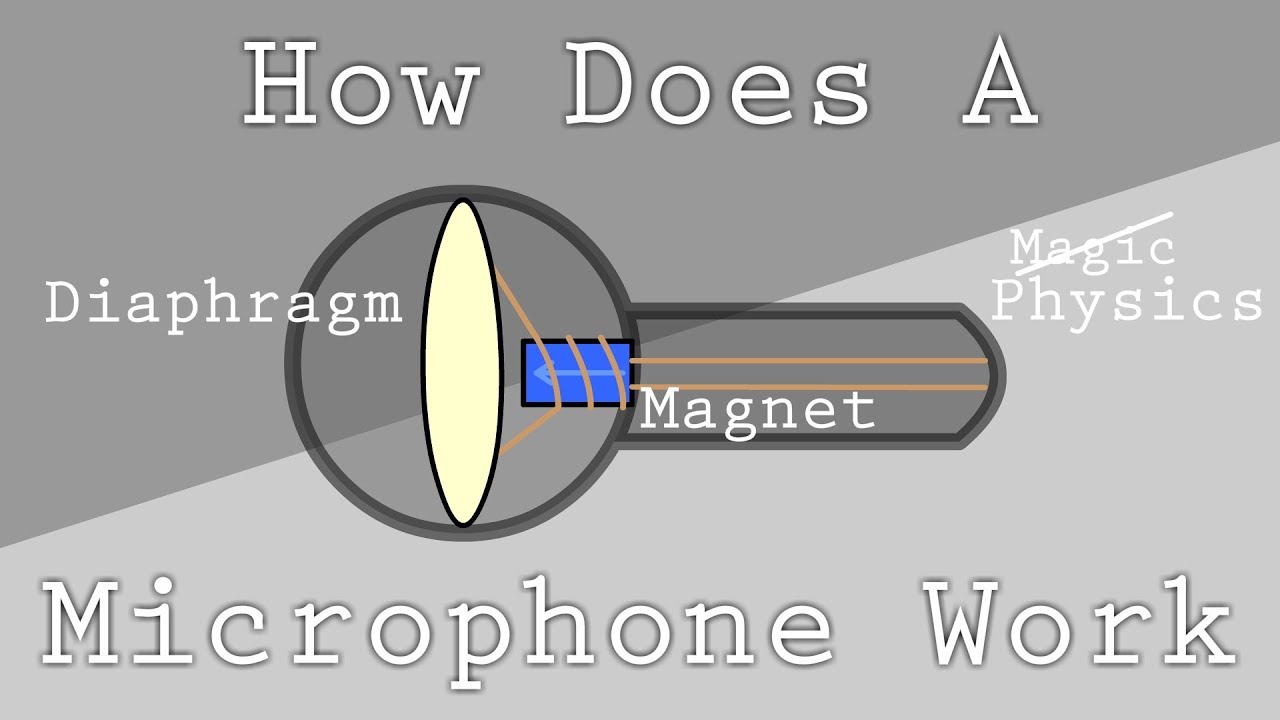
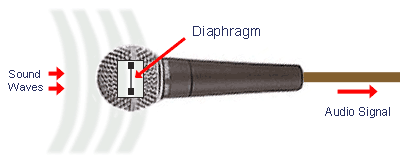
When you speak, your vocal cords make air move. These small changes in air pressure travel outward as sound waves. A microphone catches those waves with a thin part called a diaphragm.
The diaphragm moves back and forth in time with the sound. That movement then changes an electrical signal. The signal may travel to a mixer, audio interface, camera, phone, speaker, or computer.
A useful analogy is a translator. Your voice speaks in air pressure, but a recording device understands electrical changes. The microphone translates one form into the other.
How Does a Microphone Work Step by Step?
To understand how does a microphone work, follow the sound from your mouth to your recording device.
Your voice creates sound waves.
Your vocal cords vibrate and push nearby air molecules. This creates areas of higher and lower air pressure.
The sound waves reach the microphone.
The waves strike the microphone grille and move toward the diaphragm. The grille helps protect the internal parts and can reduce some wind noise.
The diaphragm moves.
The diaphragm is very thin. It moves in response to changes in air pressure. Loud sounds usually create larger movement, while quiet sounds create smaller movement.
The movement becomes an electrical signal.
A capsule inside the microphone uses the diaphragm’s motion to create a changing voltage or current. This signal follows the shape of the original sound wave.
The signal is sent to audio equipment.
A cable or wireless transmitter carries the signal to a preamp, mixer, audio interface, camera, or recorder. The equipment may increase the signal level and convert it into digital data.
The device stores or plays the sound.
A computer saves the signal as an audio file. A speaker changes the electrical signal back into air movement so people can hear it.
This process happens very quickly. The microphone does not “understand” words or music. It simply follows changes in air pressure with careful mechanical and electrical movement.
The Main Parts of a Microphone
Most microphones contain several key parts. Each one has a specific job.
Diaphragm
The diaphragm is the microphone’s listening surface. It is often made from a thin metal film, plastic, or another light material.
A smaller diaphragm tends to respond quickly to fast changes in sound. A larger diaphragm can produce a strong output and may capture a fuller tone. These are general trends, not strict rules, because the capsule design also matters.
Capsule or Transducer
The capsule holds the parts that convert movement into an electrical signal. The technical name for this conversion part is a transducer.
Different microphone types use different transducer systems. Dynamic microphones use electromagnetic induction. Condenser microphones use changes in capacitance. Ribbon microphones use a thin metal ribbon moving in a magnetic field.
Housing and Grille
The housing protects the capsule. The grille protects the diaphragm from impact, dust, and breath blasts.
Many grilles also contain foam or other materials that reduce wind noise. They cannot remove every sound problem, so good mic technique still matters.
Connector and Electronics
Wired microphones often use an XLR connector for balanced audio. USB microphones include built-in digital conversion and connect directly to a computer.
Some microphones also include a preamp, analog-to-digital converter, gain control, headphone output, or mute button. These features make the mic easier to use but can add cost and complexity.

How Dynamic Microphones Work
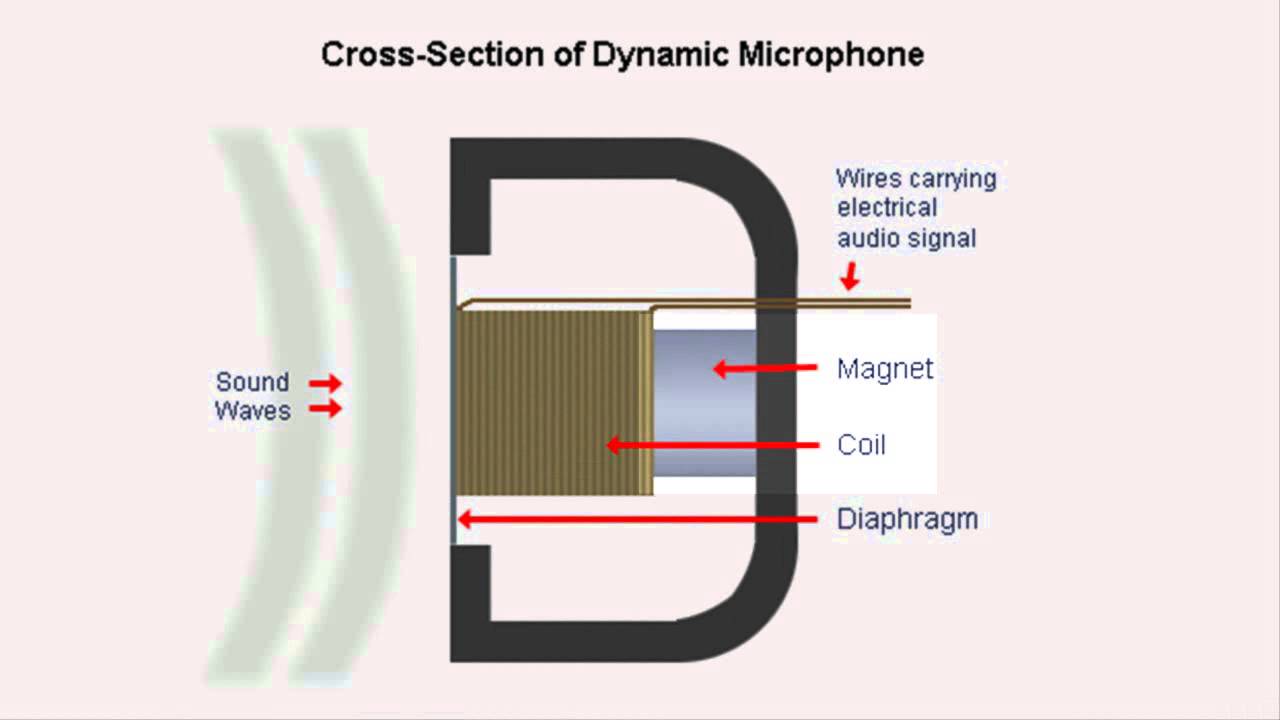
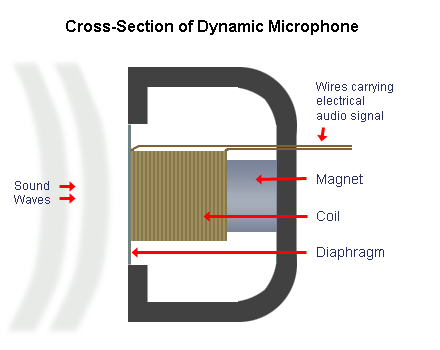
Dynamic microphones use a moving coil and a magnet. This design is strong, simple, and popular for live sound.
When sound moves the diaphragm, it also moves the attached coil. The coil sits inside a magnetic field. As it moves, it creates a small electrical voltage through electromagnetic induction.
Dynamic microphones usually:
• Handle loud sounds well
• Resist rough handling
• Need little or no external power
• Work well on stage and in untreated rooms
• Offer lower sensitivity than many condenser microphones
A classic handheld vocal mic is often dynamic. Drums, guitar cabinets, speeches, and live performances also commonly use dynamic microphones.
Dynamic microphones can reject some room noise because they often need the speaker to stay close. This does not make them magically noise-proof, but it can help in a busy room.
How Condenser Microphones Work
Condenser microphones use a thin diaphragm placed near a fixed backplate. Together, these parts form a capacitor.
When sound moves the diaphragm, the distance between the diaphragm and backplate changes. This changes the capacitance and creates an audio signal. The internal electronics then prepare that signal for the microphone output.
Condenser microphones usually:
• Capture quiet and detailed sounds
• Offer high sensitivity
• Respond well to a wide range of frequencies
• Need power for their electronics
• Work well in studios and controlled rooms
Most studio condenser microphones receive 48-volt phantom power through an XLR cable. USB condenser microphones receive power from the computer’s USB connection.
Their high sensitivity is both a strength and a weakness. A condenser mic may capture soft guitar details, but it can also capture air conditioners, computer fans, traffic, and room reflections.
How Ribbon Microphones Work
A ribbon microphone uses a very thin metal ribbon suspended between magnets. The ribbon acts as both the diaphragm and the electrical conductor.
Sound waves move the ribbon. Its movement through the magnetic field produces the audio signal.
Ribbon microphones are known for a smooth, natural sound. They often soften harsh high frequencies, which can work well on brass, guitar amplifiers, strings, and bright voices.
However, ribbon microphones need careful handling. Strong blasts of air can damage some ribbon designs. Modern active ribbon microphones are more robust, but you should still use a pop filter and avoid blowing into the mic.
Analog and Digital Microphones
The answer to how does a microphone work also depends on whether the microphone is analog or digital.
An analog microphone sends a continuously changing electrical signal through its output. An audio interface or mixer then raises the signal level and may convert it into digital data.
A digital microphone includes an analog-to-digital converter inside the microphone. It sends digital data through USB, Lightning, or another digital connection.
Analog microphone benefits
• Works with mixers, preamps, and audio interfaces
• Offers flexible signal routing
• Fits professional studio and live systems
• Allows you to choose separate preamps and converters
Digital microphone benefits
• Connects directly to many computers
• Needs fewer separate devices
• Often includes built-in controls
• Can be convenient for podcasts and video calls
A digital microphone is not automatically better. The capsule, converter, placement, room, and recording settings all affect the final result.

What Are Microphone Polar Patterns?
A polar pattern describes the directions from which a microphone hears sound. It is one of the most important features to check before buying or placing a microphone.
Cardioid
A cardioid microphone hears mainly from the front. It reduces sound from the rear and is common for vocals, podcasts, and live performances.
The name comes from its heart-shaped pickup pattern. Keep the front of the microphone aimed toward the sound source.
Supercardioid and hypercardioid
These patterns focus more tightly on the front than a standard cardioid pattern. They also pick up a small amount of sound from the rear.
They can help on loud stages, but the rear pickup area must be placed carefully. A monitor speaker in the wrong spot may cause feedback.
Omnidirectional
An omnidirectional microphone picks up sound from nearly every direction. It can sound natural and is useful for interviews, group recordings, measurement work, and room ambience.
It offers less directional control. This means it may capture more room noise and reflections.
Bidirectional
A bidirectional microphone hears from the front and rear while rejecting sound from the sides. This pattern is useful for two-person interviews and some stereo recording methods.
Shotgun
A shotgun microphone uses an interference tube to create a narrow pickup pattern. Film crews often use shotgun mics to capture dialogue from a distance.
Despite the name, a shotgun microphone does not reject all sound from the sides. Reflections and indoor room acoustics can still affect the recording.
Microphone Sensitivity, Frequency Response, and Impedance
Several specifications explain microphone behavior. They can look technical, but each one answers a practical question.
Sensitivity
Sensitivity tells you how much electrical output a microphone creates for a certain sound level. A sensitive microphone produces a stronger signal from a quiet source.
High sensitivity can help with soft sounds. It can also make unwanted room noise more noticeable.
Frequency response
Frequency response shows which pitches a microphone captures well. Human hearing is often described as ranging from about 20 hertz to 20 kilohertz, though the exact range changes with age and listening conditions.
A flat response aims to capture sound with little tonal change. A shaped response boosts or reduces certain areas. For example, a vocal mic may add presence in the upper midrange to improve speech clarity.
Impedance
Impedance describes how the microphone interacts with connected equipment. Most modern professional microphones use low impedance, which supports longer cable runs and reduces signal loss.
You usually do not need to calculate impedance for a typical setup. Use compatible equipment and balanced cables when possible.
Self-noise
Self-noise is the small amount of noise produced by the microphone itself. It matters most when recording quiet sources, such as soft speech, birds, or distant ambience.
A microphone with low self-noise can preserve more detail in quiet recordings.
Why Microphone Placement Matters
Even an expensive microphone can sound poor when placed badly. Position often matters more than price.
For spoken voice, place the microphone about 4 to 8 inches from your mouth. Use a pop filter, and aim the mic slightly to one side to reduce harsh “p” and “b” sounds.
For a singer, the best distance depends on volume and style. Moving closer can create a stronger bass effect on many directional microphones. This effect is called proximity effect.
For acoustic guitar, start by aiming the microphone toward the area where the neck meets the body. Move it slowly until the tone sounds balanced. Pointing directly at the sound hole often creates excessive bass.
For a speaker cabinet, small placement changes can strongly affect brightness and low end. Mark a useful position with tape so you can repeat the sound later.
A lesson many beginners learn after a few recordings is simple: do not solve every problem with software. Move the microphone first. A small position change can improve clarity without adding artificial equalization.
Microphone Gain and Clipping
Gain controls how much the microphone signal is boosted. Too little gain creates a weak recording that may need extra processing. Too much gain causes clipping.
Clipping happens when the signal exceeds the available level. It creates harsh distortion and can permanently damage the recording.
When recording digital audio, leave headroom. Peaks around −12 to −6 dBFS are often a practical starting range for speech and music, although the ideal level depends on the device and workflow.
Watch the meter while the loudest part occurs. Do not set the gain only while speaking softly. A sudden laugh, shout, or drum hit can overload the input.
Common Microphone Problems and Solutions
Microphone issues often have simple causes.
• Muffled sound: Move the mic closer, change its angle, or reduce excessive low frequencies.
• Plosive sounds: Use a pop filter and aim the mic slightly off-axis.
• Harsh “s” sounds: Move the mic a little to the side and reduce excessive high-frequency boost.
• Room echo: Move closer to a directional microphone and add soft materials around the recording area.
• Hum or buzz: Check cables, power connections, and nearby electrical devices. Balanced XLR connections can help reduce interference.
• Feedback: Lower the speaker volume, move the microphone away from the speaker, or change the microphone’s direction.
• Low recording level: Increase preamp gain or use a microphone with higher sensitivity.
• Handling noise: Use a stand, shock mount, or lighter grip.
The best fix depends on the cause. Avoid adding heavy noise reduction before checking the room, cable, and placement.
How to Choose the Right Microphone
Choose a microphone based on the source, room, connection, and budget.
For podcasting
A dynamic cardioid microphone can work well in a normal bedroom or home office. It focuses on your voice and can reduce some room noise.
A condenser microphone may capture more detail in a quiet, treated room. It is useful when you want a more open and polished sound.
For singing
Try both dynamic and condenser microphones if possible. Your voice, room, distance, and music style matter more than a general label.
Use a pop filter and record a short test. Listen for brightness, harshness, low-end thickness, and room reflections.
For instruments
Dynamic microphones often suit loud guitar amplifiers and drums. Condensers can capture acoustic instruments and room detail. Ribbon microphones may add a smooth character to bright sources.
For video calls
A USB microphone is usually simple to install. Place it near your mouth, use headphones to prevent echo, and select the microphone manually in your computer’s audio settings.
The most expensive option is not always the best choice. A modest microphone placed close to the source can beat a costly microphone placed across a noisy room.
How to Maintain a Microphone
Good care protects sound quality and extends the microphone’s life.
• Store the microphone in a dry, clean place.
• Use a case or pouch when transporting it.
• Keep food, drinks, and moisture away from the grille.
• Do not blow into the microphone to test it.
• Use a pop filter for close vocal work.
• Coil cables loosely instead of bending them sharply.
• Handle ribbon microphones with extra care.
• Clean the grille according to the manufacturer’s instructions.
Do not remove the grille or open the microphone unless you understand the design. Internal parts can be delicate, and some microphones contain components that require proper electrical safety.
Frequently Asked Questions About How Does a Microphone Work
How does a microphone work with a speaker?
A microphone changes sound into an electrical signal, while a speaker changes an electrical signal back into sound. The signal usually passes through a mixer or amplifier before reaching the speaker.
How does a microphone work without batteries?
Many dynamic microphones work without batteries because sound movement and electromagnetic induction create the signal. Condenser microphones usually need phantom power or another power source for their internal electronics.
How does a wireless microphone work?
A wireless microphone changes sound into an electrical signal, then sends that signal through a radio transmitter. A receiver captures the radio signal and converts it back into audio for a mixer, speaker, or recorder.
Why does a microphone need an audio interface?
An audio interface can provide preamp gain, phantom power, monitoring, and analog-to-digital conversion. USB microphones already include many of these functions inside the microphone.
Why does a microphone sound different from real life?
A microphone has its own frequency response, pickup pattern, and position. The room, distance, reflections, and recording equipment also shape the sound, so the microphone does not capture exactly what your ears perceive.
Can a microphone record sound from far away?
Some microphones are designed for distance, but no microphone removes the laws of acoustics. As distance increases, the desired sound becomes quieter compared with room noise and reflections.
Conclusion
A microphone works by turning changes in air pressure into an electrical signal. Its diaphragm moves with the sound, and a transducer converts that movement into a signal that equipment can record, process, amplify, or transmit.
Dynamic, condenser, and ribbon microphones use different methods, while polar patterns control where they listen. Placement, gain, room sound, and proper care often matter as much as the microphone itself.
Start with the microphone you have. Move it closer, test different angles, control your gain, and listen carefully. Then explore more recording techniques, compare microphone types, and share your own results in the comments.