

A wireless microphone turns sound into radio signals, sends them wirelessly, then converts them back into audio.
Understanding how does a wireless microphone work helps you choose the right system, avoid interference, and get clean sound on stage, in class, or on camera. The process may seem like magic, but it follows a clear path from your voice to a microphone capsule, transmitter, radio signal, receiver, and speaker.
What Is a Wireless Microphone?
A wireless microphone is an audio device that sends sound to a receiver without using a physical microphone cable. It still uses a microphone capsule to capture your voice, but it replaces the long cable with a short-range radio link.
A complete wireless microphone system usually has three main parts:
• Microphone: Captures sound and changes it into an electrical audio signal.
• Transmitter: Changes the audio signal into a radio signal and sends it through the air.
• Receiver: Captures the radio signal, changes it back into audio, and sends it to a mixer, amplifier, camera, or speaker.
Some systems combine the microphone and transmitter in one handheld unit. Others use a small bodypack transmitter with a lavalier or headset microphone.
This explains the basic answer to how does a wireless microphone work. Sound travels through the system in stages, much like a letter moving from a writer to a mailbox, delivery network, and reader.
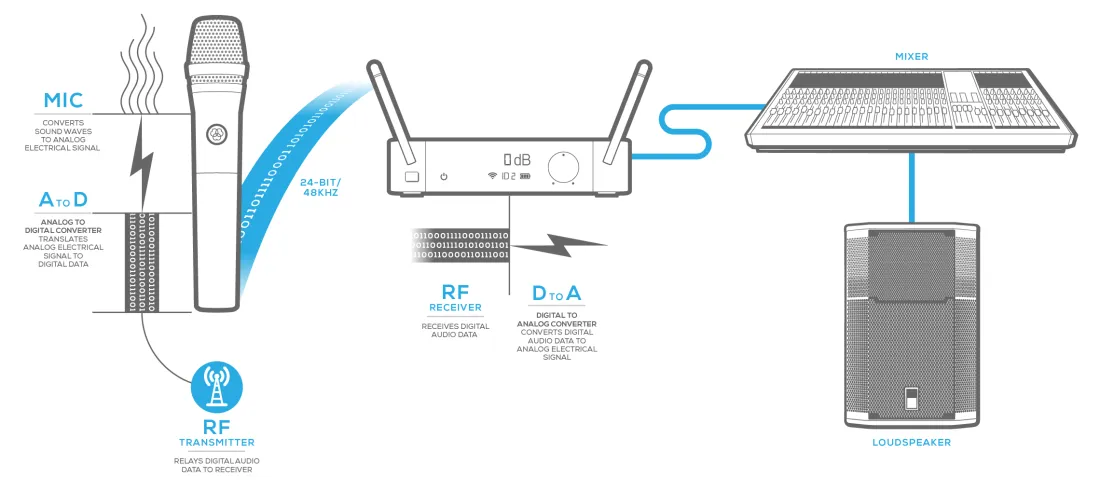
How Does a Wireless Microphone Work Step by Step?
The wireless microphone process begins when sound reaches the microphone capsule. Your voice creates changes in air pressure. The capsule detects these changes and turns them into a small electrical audio signal.
The transmitter then prepares that signal for wireless travel. It may increase the signal level, filter unwanted noise, and combine the audio with a radio carrier wave. This process is called modulation.
The radio signal travels from the transmitter antenna to the receiver antenna. The receiver selects the correct frequency, removes the carrier wave, and restores the original audio signal. It then sends that audio to your sound system.
Here is the process in simple steps:
- Your voice creates sound waves in the air.
- The microphone capsule converts sound waves into an electrical signal.
- The transmitter processes and modulates the signal.
- The transmitter antenna sends the radio signal.
- The receiver antenna picks up the signal.
- The receiver demodulates and cleans the signal.
- The receiver sends audio to a mixer, amplifier, camera, or speaker.
- The speaker changes the electrical signal back into sound.
So, how does a wireless microphone work without a cable? It uses radio-frequency communication for the connection between the transmitter and receiver. The audio signal still travels through electronic circuits, but the middle section moves through the air.
A useful practical lesson is to think of the transmitter and receiver as a matched pair. A wireless microphone cannot normally send clear sound to just any receiver. Both devices must support the same frequency range, wireless standard, and channel settings.
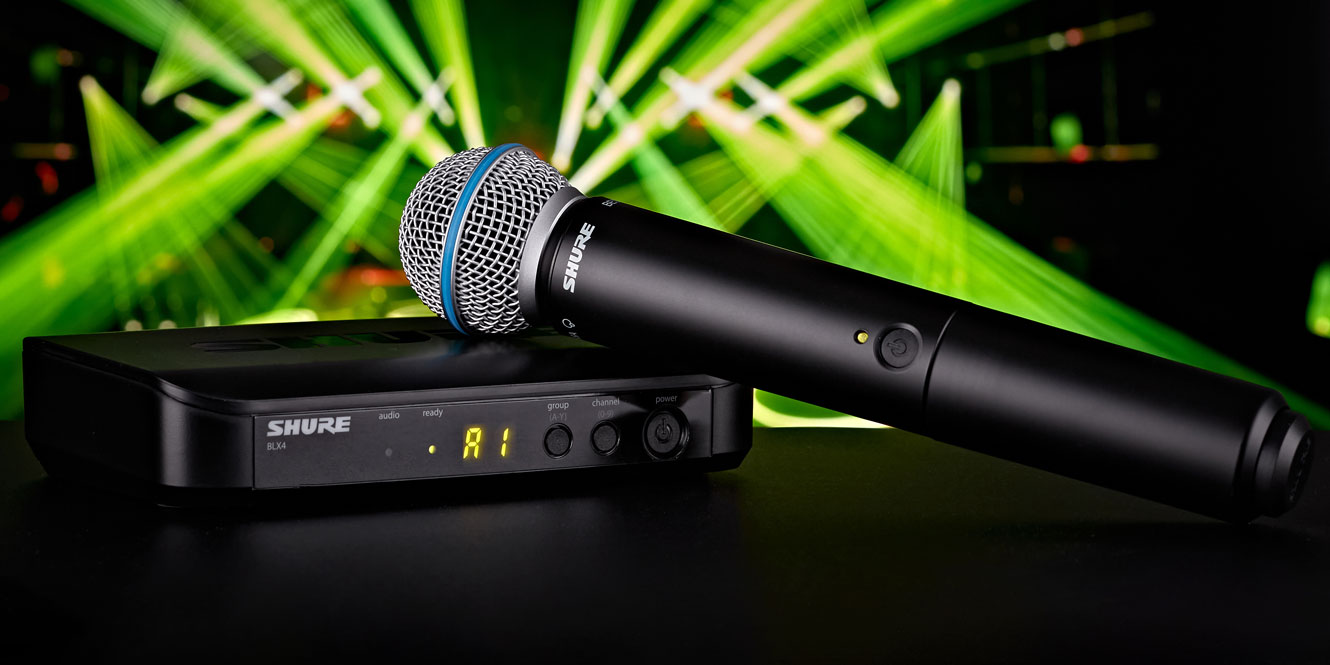
The Main Parts of a Wireless Microphone System
Knowing the parts makes it easier to understand how does a wireless microphone work in real situations. Each part has a specific job, and a problem in one part can affect the entire system.
Microphone capsule
The capsule is the part that hears your voice. Common capsule types include dynamic and condenser designs.
Dynamic capsules are tough and handle loud sound well. They are common in handheld microphones used for speeches, concerts, and live events.
Condenser capsules are often more sensitive and detailed. They are common in lavalier, headset, and studio-style microphones. They usually need power from a battery or an external source.
Transmitter
The transmitter receives the microphone’s audio signal and sends it as a radio signal. It may be built into the handheld microphone or placed in a bodypack.
A bodypack transmitter is useful for:
• Lavalier microphones clipped to clothing
• Headset microphones used by presenters
• Instruments such as guitars and violins
• Fitness classes and theater performances
The transmitter also controls important settings, such as output power, frequency, gain, and mute status.
Receiver
The receiver picks up the transmitter’s radio signal. It then changes the signal back into audio for the sound system.
Many receivers have a balanced XLR output for mixers and professional audio equipment. Some also include a ¼-inch output for smaller mixers, amplifiers, and speakers.
Antenna
Antennas send and receive radio energy. Some wireless systems use internal antennas. Others use visible antennas that can be positioned for better range.
Antenna placement matters. Keep receiver antennas clear of metal objects, crowded cables, and large electronic equipment. In larger venues, antenna distribution systems can combine several antennas and receivers more reliably.
Power source
Wireless microphones need batteries or rechargeable power. Battery condition can affect performance, especially in systems with higher transmission power.
A good event habit is to install fresh batteries before every important show. Do not assume batteries are full because the microphone turned on during a quick check.
Audio output
The receiver sends the recovered audio to another device. This may be a mixing console, powered speaker, camera, audio interface, or recording system.
Each output has a different purpose. A professional balanced output usually offers better resistance to noise over long cable runs.
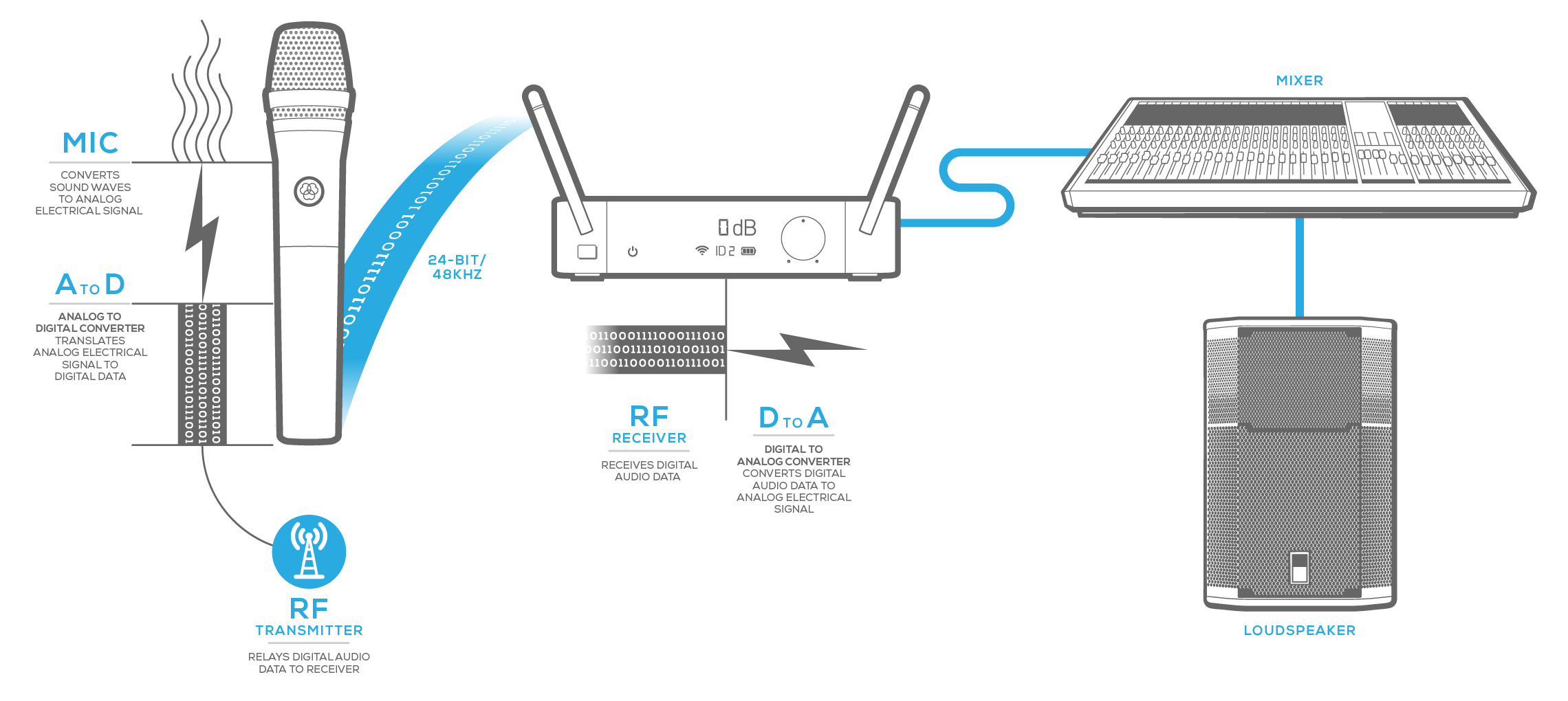
Analog and Digital Wireless Microphones
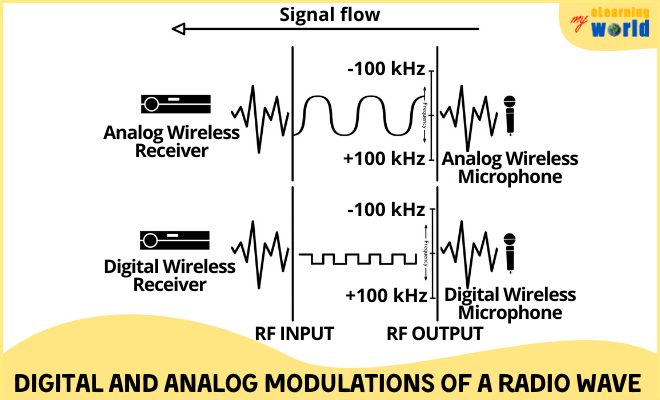
Wireless microphones use either analog or digital transmission. Both can work well, but they handle audio and radio signals in different ways.
Analog wireless systems
An analog system sends the audio as a continuous radio signal. The receiver filters and restores that signal before sending it to the sound system.
Analog systems can sound natural and respond quickly. However, weak signals may create hiss, crackle, or other noise as the transmitter moves farther from the receiver.
Digital wireless systems
A digital system converts the audio into digital data before sending it by radio. The receiver decodes that data and rebuilds the audio.
Digital systems can offer:
• Clear sound with low background noise
• Encryption options for sensitive events
• Better control of audio settings
• More efficient use of some frequency ranges
Digital systems can also have a noticeable limitation. If the signal becomes too weak, the sound may drop out instead of gradually becoming noisy. This is similar to a video stream that looks perfect until the connection suddenly fails.
The answer to how does a wireless microphone work depends partly on whether the system uses analog or digital transmission. The core path remains the same, but the way the audio is encoded and recovered changes.
Latency is another difference. Digital processing can add a small delay. Quality systems keep this delay low, but performers may notice it when monitoring their own voices through loudspeakers.

Wireless Microphone Frequencies and Channels
Wireless microphones use radio-frequency bands. The available bands depend on the country, local rules, and product design.
Common wireless microphone ranges include:
• VHF, or very high frequency
• UHF, or ultra-high frequency
• 2.4 GHz systems
• Other regulated professional bands
UHF systems have long been popular for professional events because they can provide reliable range and many channel choices. Systems in the 2.4 GHz band are convenient and widely available, but they share spectrum with Wi-Fi, Bluetooth, and other devices.
A channel is a specific frequency or frequency setting used by the transmitter and receiver. The transmitter and receiver must use a compatible channel for communication.
Modern systems often scan the area and suggest open channels. This feature is helpful, but it is not perfect. A venue may become crowded after the scan, especially when many wireless systems, routers, phones, and production devices are active.
In the United States, wireless microphone users must follow Federal Communications Commission rules. Certain frequencies require a license, while others may be available under specific low-power or unlicensed conditions. Always check current local regulations before using a professional system at a large event.
Frequency coordination becomes important when using several wireless microphones. Two transmitters set too close together can interfere with one another. A qualified audio technician may use coordination software or spectrum analysis tools to plan compatible channels.
This is an important part of how does a wireless microphone work in the real world. The microphone may be working correctly, yet a crowded or poorly planned radio environment can still cause dropouts.

What Causes Wireless Microphone Interference?
Interference happens when unwanted radio energy disrupts the signal between a transmitter and receiver. It can sound like buzzing, clicking, static, distortion, or sudden silence.
Common causes include:
• Two wireless systems using conflicting frequencies
• Wi-Fi routers and Bluetooth devices near 2.4 GHz systems
• Metal barriers between the transmitter and receiver
• Low batteries
• Damaged antennas
• Excessive distance
• Poor frequency coordination
• Strong radio signals from nearby equipment
Physical obstacles matter too. The human body contains a large amount of water, which can weaken some radio signals. If someone covers the transmitter antenna with their hand or places it under heavy clothing, the range may drop.
A practical setup routine can prevent many problems:
- Place the receiver where it has a clear view of the performance area.
- Keep the transmitter antenna away from large metal objects.
- Avoid placing receivers directly beside wireless routers.
- Scan for available channels before the event.
- Turn on all wireless systems during the final sound check.
- Test the full walking path, not just the stage center.
- Keep backup batteries and a wired microphone nearby.
One common mistake is testing a wireless microphone only while standing next to the receiver. The system may sound perfect at that distance but fail when the speaker walks behind a wall or into the audience.
Understanding how does a wireless microphone work makes troubleshooting less stressful. Start at the source, then check the transmitter, frequency, antenna, receiver, cable, and sound system in that order.
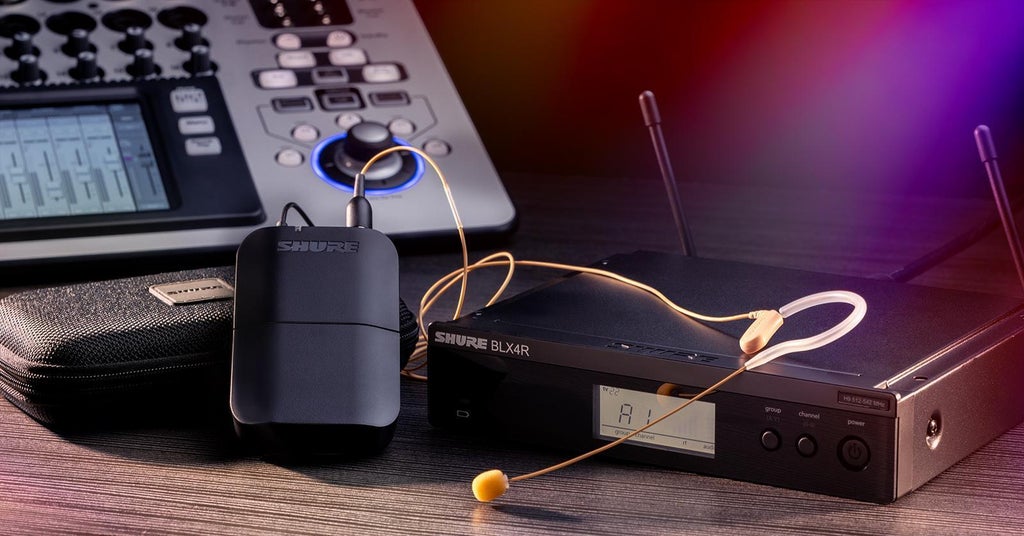
Wireless Microphone Range and Reliability
Wireless microphone range depends on the transmitter’s power, antenna design, receiver sensitivity, frequency band, obstacles, and local radio conditions. A product may advertise a maximum range, but that figure often assumes open space with little interference.
Indoor range is usually shorter because walls, people, ceilings, and metal structures absorb or reflect radio signals. Outdoor range can be better, but nearby radio activity may still create problems.
For reliable operation:
• Keep the transmitter and receiver within a sensible distance.
• Maintain a clear line of sight when possible.
• Avoid placing the receiver on the floor behind equipment.
• Use receiver antennas designed for the system.
• Consider antenna distribution for multiple receivers.
• Use diversity reception when available.
Diversity receivers use two or more antennas or receiver circuits. The system compares the incoming signals and chooses the stronger one. This reduces dropouts caused by reflections and movement.
Some professional systems use true diversity or advanced digital diversity designs. These are more dependable than a simple receiver with one antenna, especially in large rooms.
The best way to judge how does a wireless microphone work at a specific venue is to test it in that venue. Room shape, building materials, crowd size, and nearby equipment all affect results.

Wireless Microphone Benefits and Limitations
Wireless microphones offer clear advantages, but they are not the best choice for every situation.
Benefits
• Freedom to move: Speakers, performers, and presenters can move without dragging a cable.
• Cleaner stages: Fewer cables can reduce clutter and trip hazards.
• Flexible video work: A camera operator can record sound while the subject moves.
• Fast setup: A coordinated system can be quick to deploy.
• Better audience contact: Presenters can walk among attendees and interact with them.
Wireless systems are especially useful for theater, worship services, weddings, lectures, fitness classes, interviews, and live broadcasts.
Limitations
• Battery dependence: The system can fail when batteries run out.
• Radio interference: Nearby devices or poor frequency planning can cause noise or dropouts.
• Higher cost: Professional wireless equipment often costs more than a wired microphone.
• Security concerns: Some signals may be intercepted unless the system supports encryption.
• Added latency: Digital systems can introduce a small delay.
• Maintenance needs: Antennas, connectors, battery doors, and frequency settings require care.
A wired microphone remains a strong choice when maximum reliability matters and movement is not important. It does not need batteries, and its cable is not affected by radio interference.
The right question is not whether wireless is always better. It is whether the freedom of movement is worth the extra planning and maintenance.

How to Set Up a Wireless Microphone
A careful setup helps you get the most from your system. Use this basic process for a meeting, performance, classroom, or recording session.
Charge or replace the batteries
Use fully charged batteries or fresh batteries from the same type. For major events, keep a spare set for every transmitter.Connect the receiver
Connect the receiver to the mixer, speaker, camera, or audio interface. Select the correct input and set the input gain low at first.Match the transmitter and receiver
Set both devices to the same channel or use the system’s automatic pairing feature. Confirm that the receiver shows a stable connection.Position the receiver
Place it in an open location with the antennas upright or according to the manufacturer’s instructions. Do not hide it inside a metal cabinet.Set microphone gain
Speak at the same volume you will use during the event. Adjust the transmitter gain so normal speech is strong but does not clip.Perform a walk test
Walk through the entire performance area. Listen for noise, dropouts, distortion, and changes in volume.Check the complete signal path
Test the microphone, receiver, mixer, amplifier, speaker, camera, and recording device. A wireless signal can be healthy while a cable or input setting is wrong.Prepare a backup
Keep a wired microphone ready. It can save a presentation when a battery, antenna, or frequency problem appears.
A lesson experienced audio teams learn quickly is that sound checks should imitate the real event. If a presenter will turn away, walk into the crowd, or speak softly, test those actions before the audience arrives.
How to Maintain a Wireless Microphone
Good maintenance protects sound quality and extends equipment life.
After each use, wipe the microphone body and sanitize shared grilles according to the manufacturer’s guidance. Do not soak electronic parts or use harsh fluids near switches, connectors, or battery compartments.
Store transmitters and receivers in a dry case. Remove disposable batteries during long storage because leaking batteries can damage contacts and circuit boards.
Check these items often:
• Battery contacts
• Antennas and antenna connectors
• Microphone grilles
• Bodypack cable connectors
• Mute switches
• Receiver display and controls
• Output cables
• Charging docks
Keep a written list of frequency settings if you manage several systems. Label each transmitter and receiver clearly. This simple step prevents the classic mistake of pairing the wrong microphone with the wrong receiver.
If a microphone sounds muffled, first inspect the grille and capsule area. If it cuts out, replace the battery, check the antenna, and test a different channel. Change only one thing at a time so you know which action solved the issue.
That method makes it easier to understand how does a wireless microphone work and where a fault may be located.
Choosing the Right Wireless Microphone
Select a system based on your use, environment, and budget.
For a singer, a handheld wireless microphone with a strong dynamic capsule may be the best fit. For a presenter, a lavalier or headset system may provide more natural movement. For video interviews, a compact camera receiver or dual-channel system can be useful.
Consider these factors:
• Microphone type: Handheld, lavalier, headset, or instrument
• Operating range: The distance needed in the venue
• Frequency options: Important when several systems operate together
• Battery life: Essential for long events
• Output type: XLR, ¼-inch, USB, or camera connection
• Latency: Important for performers and live monitoring
• Encryption: Useful for confidential speech
• Build quality: Important for frequent travel and stage use
• Local regulations: Required for lawful frequency use
Avoid judging a wireless microphone only by its advertised range or price. A less expensive system may work well in a small classroom but struggle in a crowded concert venue. A professional system may be unnecessary for a short home video.
The best decision comes from matching the equipment to the setting. When you know how does a wireless microphone work, product specifications become easier to compare.
Frequently Asked Questions About How Does a Wireless Microphone Work
How does a wireless microphone transmit sound?
A wireless microphone changes sound into an electrical audio signal. Its transmitter converts that signal into a radio signal, which travels to a receiver and becomes audio again.
Does a wireless microphone need Wi-Fi?
Most wireless microphones do not need Wi-Fi. They usually communicate directly with a dedicated receiver through radio frequencies, although some modern networked systems can use Wi-Fi-based technology.
Why does a wireless microphone keep cutting out?
Dropouts may result from low batteries, excessive distance, blocked antennas, radio interference, or conflicting channels. Replace the batteries, improve the receiver position, and test a cleaner frequency.
How far can a wireless microphone work?
The range varies by model and environment. Walls, metal, people, transmitter power, antenna design, and interference can reduce the practical range below the advertised maximum.
Are wireless microphones better than wired microphones?
Wireless microphones provide freedom of movement and a cleaner stage, but wired microphones are often simpler and more resistant to interference. The better choice depends on whether mobility or maximum simplicity matters more.
Can a wireless microphone work without a receiver?
Most traditional wireless microphones need a compatible receiver to recover the audio signal. Some newer systems connect directly to phones, computers, or speakers through Bluetooth or proprietary wireless technology, but they still use a receiving circuit.
How long do wireless microphone batteries last?
Battery life depends on the transmitter, battery type, transmission power, and usage pattern. Check the manufacturer’s rating, but replace or recharge batteries before important events rather than waiting for the warning.
Conclusion
A wireless microphone captures your voice, converts it into an electrical signal, sends it as a radio transmission, and uses a receiver to restore the audio. Its performance depends on the microphone capsule, transmitter, receiver, antennas, batteries, frequency planning, and the conditions around you.
Now that you understand how does a wireless microphone work, you can set up one with greater confidence and solve common problems faster. Test the full operating area, coordinate frequencies, protect your batteries, and keep a wired backup available for important events. Explore more audio guides, compare systems carefully, and share your wireless microphone setup or questions in the comments.