

A microphone converts sound waves into an electrical signal that recording devices can store, process, or amplify.
Understanding what does a microphone do helps you choose the right mic for podcasts, music, video calls, live events, and film. The basic idea is simple, but microphone design, placement, room sound, and signal processing all affect the final result. This guide explains the process in clear terms and shares practical tips for getting cleaner audio.
What Does a Microphone Do?
A microphone captures sound in the air and changes it into an electrical audio signal. That signal can then travel to a mixer, audio interface, camera, computer, speaker, or recording device.
Sound begins as vibration. When you speak, your vocal cords move air molecules. Those moving molecules create sound waves. A microphone detects the waves and produces a matching electrical pattern.
The microphone does not understand words or music. It only responds to changes in air pressure. Your recording device or software later turns those changes into digital data that you can edit, save, stream, or play back.
A simple way to understand what does a microphone do is to compare it with an interpreter. Your voice speaks in air pressure, while your recording system works with electrical or digital signals. The microphone translates one form into another.

How a Microphone Converts Sound Into a Signal
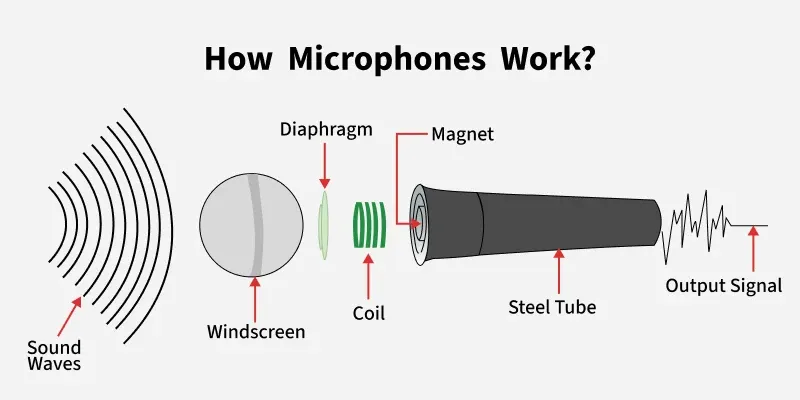
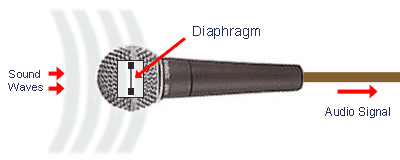
Most microphones use a thin part called a diaphragm. The diaphragm moves when sound waves hit it. Its movement is similar to the way a drumhead moves when you tap it.
Behind the diaphragm, a microphone uses different parts to create an electrical signal. The design depends on the microphone type.
The basic signal path
The process usually follows these steps:
- Your voice or an instrument creates sound waves.
- The waves move the microphone’s diaphragm.
- The diaphragm changes an electrical field, magnetic field, or light-based system.
- The microphone produces an analog audio signal.
- An audio interface or other device may convert the signal into digital data.
- Speakers or headphones turn the signal back into sound.
This process happens very quickly. In a live show, the microphone sends the signal through a cable to a mixing console. The console adjusts the sound and sends it to amplifiers and speakers.
In a podcast setup, the microphone may send audio to a USB port. The computer then records the signal inside software such as a digital audio workstation. In both cases, what does a microphone do remains the same: it turns sound movement into a usable signal.

The Main Types of Microphones
Microphones differ in sensitivity, sound character, durability, and power needs. The three main types are dynamic, condenser, and ribbon microphones.
Dynamic microphones
A dynamic microphone uses a diaphragm, voice coil, and magnet. When sound moves the diaphragm, the coil moves inside the magnetic field and creates an electrical signal.
Dynamic microphones are often:
• Strong and durable
• Less sensitive to quiet room sounds
• Useful for live vocals and loud instruments
• Common in broadcasting and stage performances
A dynamic microphone can handle high sound pressure levels. This makes it a popular choice for guitar amplifiers, drums, and loud singers. It usually does not need external power.
The trade-off is that many dynamic microphones need more gain than condenser models. A weak audio interface may produce hiss when you turn the gain up too far.
Condenser microphones
A condenser microphone uses a lightweight diaphragm and a backplate. Together, they form a capacitor. When the diaphragm moves, the electrical charge changes and creates the audio signal.
Condenser microphones are often:
• More sensitive to quiet sounds
• Detailed and clear
• Useful for studio vocals and acoustic instruments
• Available in large-diaphragm and small-diaphragm designs
Most condenser microphones need power. Studio models often use 48-volt phantom power from an audio interface or mixer. USB condenser microphones receive power from the computer.
Because condenser microphones capture more detail, they also capture more room noise. A noisy air conditioner, hard wall, or nearby computer fan can become part of the recording.
Ribbon microphones
A ribbon microphone uses a very thin strip of metal suspended in a magnetic field. Sound moves the ribbon, which creates the electrical signal.
Ribbon microphones often produce a smooth, natural sound. They are valued for guitar cabinets, brass instruments, strings, and some vocal styles. Older ribbon models can be delicate, though many modern designs are more rugged.
A key point is that some passive ribbon microphones should not receive phantom power. Always check the manufacturer’s instructions before connecting one.
What Does a Microphone Do in Different Devices?
The core job stays the same, but the microphone’s role changes based on the device.
In a smartphone
A phone microphone captures your voice for calls, videos, voice notes, and noise reduction. Modern phones may use several microphones at once.
One microphone may focus on your voice while another detects background noise. The phone then compares the signals and reduces some unwanted sound. This process is called noise cancellation or noise suppression.
In a computer or USB microphone
A USB microphone contains both a microphone capsule and a small audio interface. The capsule captures sound, while the built-in converter changes the analog signal into digital data.
This design makes USB microphones easy to use. You can connect one directly to a computer without buying a separate interface. However, advanced studio setups may still benefit from an XLR microphone and external interface.
In a camera
A camera microphone records sound with video. Built-in camera microphones are convenient, but they often sit far from the person speaking. Distance causes a weak voice, more room echo, and more background noise.
A camera-mounted shotgun microphone or wireless lavalier microphone can place the microphone closer to the speaker. That often improves speech more than buying a more expensive camera.
In a hearing or communication system
Some communication systems use microphones to capture speech and send it to an amplifier or processor. The system may adjust volume, reduce noise, or improve speech clarity for the listener.

What Is the Difference Between a Microphone and a Speaker?
A microphone changes sound into an electrical signal. A speaker does the reverse by changing an electrical signal into sound.
You can think of them as opposite tools:
• A microphone is an input device.
• A speaker is an output device.
• An audio interface connects microphones and other audio equipment.
• An amplifier increases signal strength.
A microphone does not make sound louder by itself. It creates a signal that another device can amplify. This distinction explains why a microphone connected to a speaker needs a mixer, amplifier, or powered speaker system.
The same principle applies to feedback. Feedback happens when a microphone picks up sound from a speaker, sends it back through the system, and receives the amplified sound again. The loop grows louder until it creates a ringing or squealing noise.

Microphone Pickup Patterns Explained
A pickup pattern describes the directions from which a microphone captures sound. Choosing the right pattern can improve clarity and reduce unwanted noise.
Cardioid
A cardioid microphone captures the most sound from the front and rejects much of the sound from the rear. It is a common choice for vocals, podcasts, presentations, and live stages.
Supercardioid and hypercardioid
These patterns focus more tightly on the front. They can reject more side noise, but they may capture some sound from the rear. Careful placement is important.
Omnidirectional
An omnidirectional microphone captures sound from nearly every direction. It can sound natural and consistent when the speaker moves.
This pattern works well for some lavalier microphones, conference rooms, interviews, and outdoor measurement work. It is less useful when you need strong rejection of room noise.
Bidirectional
A bidirectional microphone captures sound from the front and rear while rejecting the sides. It can work well for two-person interviews when both people sit on opposite sides of the microphone.
Shotgun microphones
A shotgun microphone uses a long interference tube to focus on sound from the front. It is common in film and video production.
A shotgun microphone is not magic, though. It still works best when placed close to the subject. Indoors, reflections from walls can reduce its ability to isolate speech.

Why Microphone Placement Matters
Many people ask what does a microphone do when they really need to know how to use one. Placement often matters more than microphone price.
For spoken voice, place the microphone close enough to capture a strong voice but far enough to avoid harsh breath sounds and sudden volume changes. A common starting point is about 4 to 8 inches from the speaker, depending on the microphone and voice.
Use a pop filter for plosive sounds. Plosives happen when bursts of air from sounds such as “P” and “B” hit the diaphragm. A pop filter spreads out the air and reduces those low-frequency thumps.
Try these practical steps:
• Aim the microphone toward the speaker’s mouth.
• Keep the microphone slightly off to one side to reduce breath noise.
• Use a stable stand or boom arm.
• Point the rear of a cardioid microphone toward the main noise source.
• Record a short test before the full session.
• Watch the input level and avoid clipping.
In my practical testing experience, moving a microphone closer often improves speech more than adding expensive plug-ins. A close microphone captures more direct voice and less room sound. The most common mistake is placing a good microphone too far away.

Microphone Sensitivity, Gain, and Volume
Microphone sensitivity describes how much electrical output a microphone creates for a given sound level. A sensitive microphone produces a stronger signal from a quiet source.
Gain controls how much the preamp boosts the microphone signal. Volume usually controls the level after the signal has already been amplified or processed.
These controls are not the same:
• Microphone sensitivity comes from the microphone’s design.
• Gain boosts the incoming microphone signal.
• Volume changes the output level sent to headphones or speakers.
If the gain is too low, the recording may sound quiet. If you raise it later, you may also raise background hiss. If the gain is too high, the signal can clip and become distorted.
For digital recording, leave some headroom. Peaks around minus 12 to minus 6 decibels full scale are a useful starting point for many speech recordings. Exact levels depend on the system, but avoiding red meters is always wise.
Analog and Digital Microphones
Traditional XLR microphones produce an analog signal. The signal travels through an XLR cable to a preamp or audio interface. The interface then converts it into digital audio for a computer.
USB microphones include this conversion inside the microphone body. They are simple and portable, but they may offer fewer routing and upgrade options.
Some modern microphones connect through network audio systems. These are common in large venues, broadcast facilities, and professional installations.
When comparing microphone systems, consider:
• Connection type
• Required power
• Audio interface compatibility
• Number of people or sources you need to record
• Portability
• Monitoring and latency
• Future upgrade plans
A USB microphone is often enough for a solo podcast or video call. An XLR system may be better for multiple microphones, live sound, or a growing studio.
What Does a Microphone Do Well?
A microphone provides several important benefits in communication and media production.
It preserves speech
A well-placed microphone makes speech easier to understand. This matters in podcasts, online courses, meetings, films, and public events.
It supports creative work
Musicians use microphones to record vocals, guitars, drums, pianos, orchestras, and sound effects. Each microphone type can bring out different parts of a source.
It enables live sound
Concerts, theaters, schools, and houses of worship use microphones to send voices and instruments to a larger audience.
It supports accessibility
Clear sound helps people follow lessons, meetings, announcements, and broadcasts. Good microphone use can make communication more inclusive.
It enables measurement
Special microphones can measure sound pressure and frequency response. Engineers use them to test rooms, loudspeakers, and equipment.
Microphone Limitations and Common Problems
A microphone cannot fix every audio problem. It captures what reaches its diaphragm, including unwanted sound.
Common problems include:
• Room echo from hard walls and floors
• Background noise from fans, traffic, and appliances
• Handling noise from touching the stand or cable
• Plosive bursts from speech
• Clipping from excessive input gain
• Electrical hum from cables or power systems
• Feedback from nearby speakers
The room is part of the recording. Soft furniture, curtains, carpets, and acoustic panels can reduce reflections. You do not always need expensive foam. Even changing the microphone position and turning off a noisy fan can help.
Do not confuse noise reduction with true sound quality. Software can reduce some steady noise, but heavy processing may create watery or artificial speech. The best result usually starts with a clean recording.
How to Choose the Right Microphone
Start with the source, environment, and connection. Do not choose a microphone only because it is popular online.
Use this simple guide:
• Choose a dynamic microphone for loud sources, untreated rooms, and live speech.
• Choose a condenser microphone for detailed studio vocals and acoustic instruments.
• Choose a lavalier microphone for hands-free interviews and presentations.
• Choose a shotgun microphone for focused video dialogue.
• Choose a USB microphone for simple computer recording.
• Choose an XLR microphone for flexible studio or live systems.
Also consider the microphone’s pickup pattern. A sensitive condenser microphone may sound excellent in a quiet room but expose every reflection in a bare office.
The best microphone is the one that fits your voice, room, source, and workflow. A skilled user with a modest microphone can often produce better audio than an inexperienced user with costly equipment.
Practical Tips for Better Microphone Sound
A few small changes can make a major difference.
- Position the microphone close to the sound source.
- Speak across the microphone instead of directly into it if plosives are a problem.
- Use a pop filter or foam windscreen when appropriate.
- Keep the microphone away from hard, reflective surfaces.
- Set gain while speaking at your real performance level.
- Monitor with headphones during setup.
- Record a test and listen for echo, hiss, and distortion.
- Keep cables away from power adapters when possible.
- Use shock mounts for sensitive studio microphones.
- Save a clean, unprocessed version of every important recording.
One lesson worth remembering is that microphone technique is part of audio quality. Turn your head away, move closer, or speak more softly, and the recorded tone changes. Consistent distance gives your editor a much easier job.
Frequently Asked Questions About What Does a Microphone Do
What does a microphone do in simple terms?
A microphone changes sound waves in the air into an electrical or digital audio signal. Another device can then record, amplify, edit, or transmit that signal.
Does a microphone make your voice louder?
Not by itself. A microphone captures your voice, while an amplifier, mixer, computer, or powered speaker increases the signal for listeners.
What is the difference between a USB and XLR microphone?
A USB microphone connects directly to a computer and usually includes its own analog-to-digital converter. An XLR microphone connects to an audio interface or mixer and offers more flexibility for advanced setups.
Do all microphones need power?
No. Many dynamic microphones work without external power. Condenser microphones commonly need phantom power, a battery, or power from a USB connection.
Why does my microphone sound muffled?
A muffled sound may come from poor placement, a blocked grille, excessive distance, room reflections, or incorrect equalization. Move the microphone closer, aim it correctly, and check the recording level before changing software settings.
Can a microphone remove background noise?
A microphone can reduce background noise through its pickup pattern and placement, but it cannot remove all unwanted sound. Noise reduction software may help, yet a quiet room and close microphone position usually provide better results.
Is an expensive microphone always better?
No. Microphone quality depends on the source, room, placement, and user technique. A less expensive microphone in the right position can outperform a premium microphone used in a noisy or echo-filled room.
Conclusion
A microphone detects changes in air pressure and converts them into an electrical or digital signal. Its design affects sensitivity, tone, direction, power needs, and performance in different environments.
The answer to what does a microphone do is simple, but using one well takes practice. Start with good placement, suitable gain, a quiet space, and the right microphone type for your source. Test your setup, listen closely, and keep improving your technique. Explore more recording guides, try different microphone positions, and share your questions or results in the comments.