

Yes, you can run a microphone through a guitar pedal, but you need the right signal level and adapter.
Can you run a microphone through a guitar pedal without damaging your gear or getting a weak, noisy tone? Yes, but the setup matters. Microphones and electric guitars produce different signal levels and use different connectors, so a simple cable may not always give good results.
This guide explains how to connect a microphone to a guitar pedal, which microphones and pedals work best, how to avoid noise and distortion, and when you need a preamp, mixer, or special adapter. Whether you want vocal distortion, lo-fi speech, robotic effects, or a unique live sound, you can build a reliable signal chain with a few smart choices.
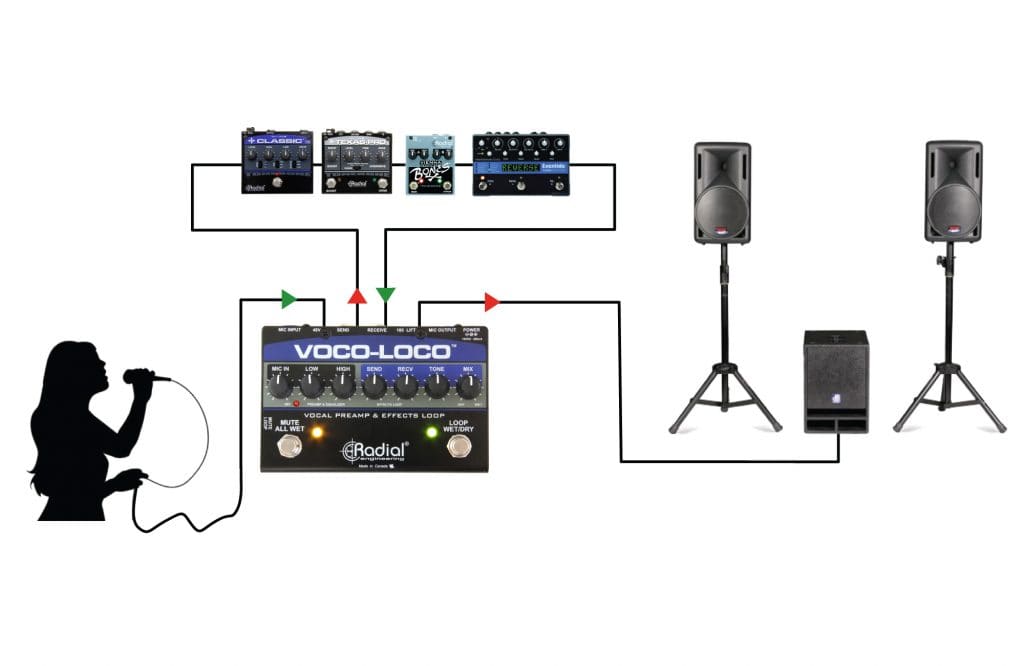
Can You Run a Microphone Through a Guitar Pedal?
Yes, you can run a microphone through a guitar pedal. Many musicians use guitar pedals with vocals, podcast effects, drum machines, keyboards, and other instruments. The main challenge is not whether the pedal can process the sound. The challenge is matching the microphone’s output to the pedal’s input.
Most guitar pedals expect an instrument-level signal from an electric guitar or bass. A microphone usually sends a lower mic-level signal. This difference can make the pedal sound quiet, thin, or noisy.
A microphone also commonly uses a balanced XLR connection. Most guitar pedals use an unbalanced ¼-inch TS input and output. Because of this, you may need extra equipment between the microphone and pedal.
The basic answer to can you run a microphone through a guitar pedal is simple: yes, but use the correct signal path.

Why Microphones and Guitar Pedals Use Different Signals
A guitar pickup and a microphone do not produce the same type of signal. Understanding this difference helps you choose the right setup.
Microphone-level signal
A microphone sends a mic-level signal. This signal is usually very quiet and needs more gain before it reaches a pedal, amplifier, or recording interface.
Dynamic microphones often produce less output than condenser microphones. A soft vocal from a dynamic microphone may need even more gain.
Instrument-level signal
A guitar pedal expects an instrument-level signal. This signal is stronger than mic level but weaker than line level.
Guitar pickups also have a different impedance than many microphones. This affects brightness, volume, and the way the pedal reacts to the sound.
Line-level signal
Mixers, audio interfaces, and preamps often send line-level signals. Line level is much stronger than the signal from a microphone or guitar pickup.
Sending a strong line-level signal directly into some guitar pedals can cause unwanted clipping. That clipping may sound exciting with a distortion pedal, but it can sound harsh with delay, chorus, or modulation pedals.
This is why can you run a microphone through a guitar pedal depends on gain staging. The signal must be strong enough to avoid noise but not so strong that it overloads the pedal’s input.
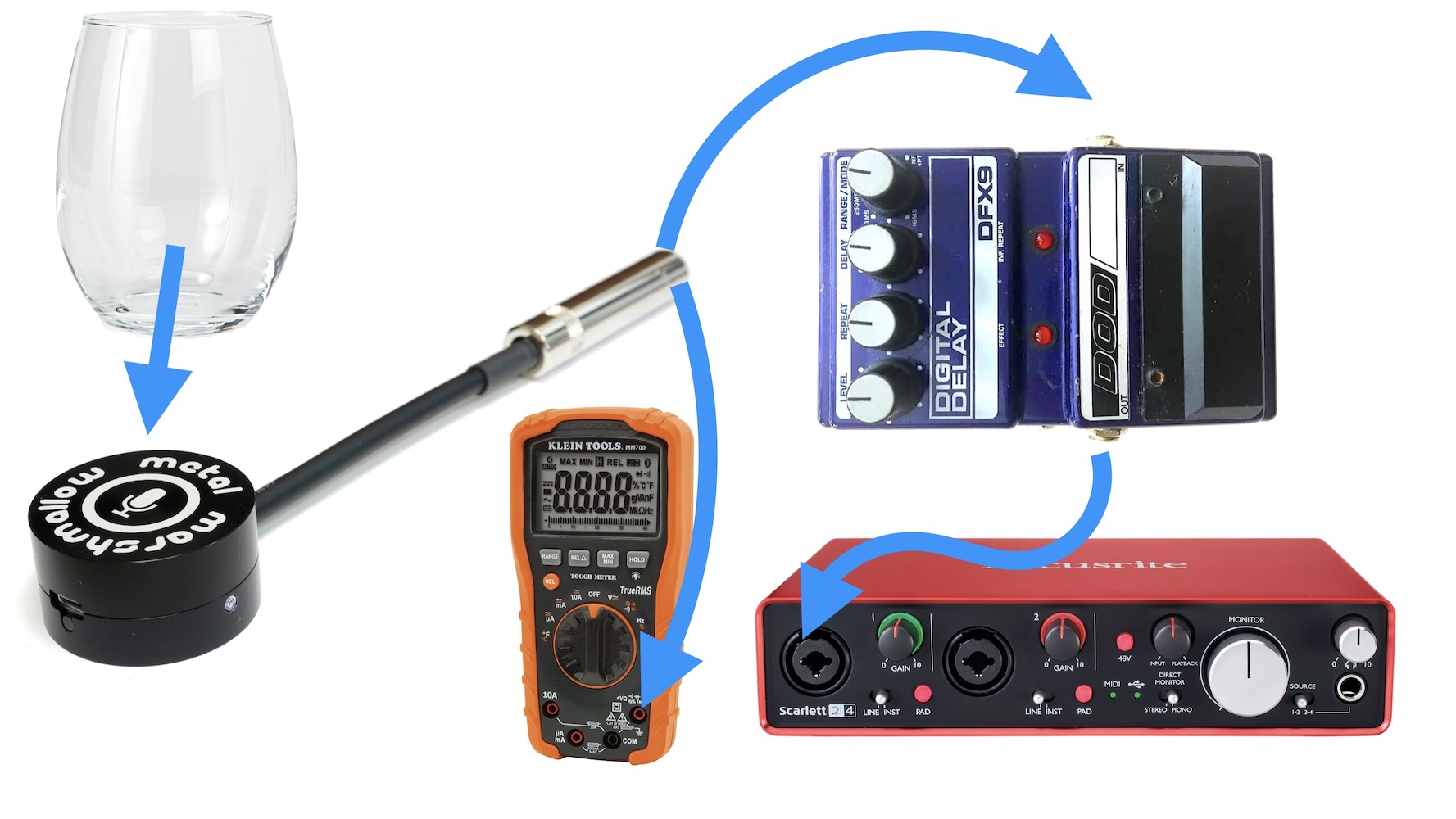
What You Need to Connect a Microphone to a Guitar Pedal
The simplest setup depends on your microphone type and the pedal you want to use.
For many setups, you may need:
• A microphone with an XLR output
• An XLR microphone cable
• A microphone preamp, mixer, or audio interface
• An XLR to ¼-inch adapter or suitable conversion box
• One or more ¼-inch instrument cables
• The guitar pedal
• An amplifier, mixer, powered speaker, or recording interface
A basic chain may look like this:
- Microphone
- Microphone preamp or mixer
- ¼-inch output from the preamp
- Guitar pedal
- Amplifier, mixer, or audio interface
A practical example is:
Microphone → mixer mic input → mixer ¼-inch output → guitar pedal → powered speaker
You can also use a dedicated microphone-to-pedal interface. These devices are made to convert a microphone signal into a format that guitar pedals can accept.
Avoid using a random XLR to ¼-inch cable without checking its wiring and purpose. It may connect physically but still produce a weak signal, excessive noise, or an incorrect impedance match.

The Best Signal Chain for Vocals and Guitar Pedals
For live vocals, a mixer or microphone preamp usually gives the most control. It lets you raise the microphone signal before it reaches the pedal.
A reliable live chain is:
Microphone → mixer preamp → pedal → mixer or amplifier
However, this setup needs careful volume control. Raise the microphone gain until the signal is strong and clean. Then send a moderate output level to the pedal.
For recording, you can use an audio interface:
Microphone → audio interface preamp → pedal send → pedal return → interface
This method is more advanced. Your interface needs an output and input that you can route separately. Some interfaces also have an instrument or reamp output, which can make the connection easier.
For a simple home setup, try:
Dynamic microphone → mic preamp → overdrive pedal → guitar amp
This setup works well for gritty vocals and spoken effects. Keep the amp volume low at first. A microphone placed near a loud amp can create feedback quickly.

Can You Plug a Microphone Directly Into a Guitar Pedal?
Sometimes, but direct connection is usually not the best choice.
A dynamic microphone may produce a signal that is too quiet for a guitar pedal. The pedal may still create an effect, but you may hear hiss when you increase the pedal or amplifier volume.
A condenser microphone creates another issue. It needs phantom power, usually 48 volts, from a mixer, preamp, or audio interface. Most guitar pedals do not provide phantom power.
Never assume a guitar pedal can power a condenser microphone. Use a proper microphone preamp or mixer that provides phantom power.
A direct connection may work better with:
• A high-output dynamic microphone
• A pedal designed for vocals
• A microphone preamp built into an interface or mixer
• A pedal with a mic-level input
The answer to can you run a microphone through a guitar pedal directly is therefore “sometimes.” It is safer and more reliable to use a preamp or dedicated vocal pedal interface.

Which Microphones Work Best With Guitar Pedals?
Dynamic microphones
Dynamic microphones are often the easiest choice. They are rugged, do not need phantom power, and handle loud sources well.
A common vocal dynamic microphone can work nicely with distortion, fuzz, lo-fi, ring modulation, and filter pedals. Its lower sensitivity can also reduce feedback in live settings.
Condenser microphones
Condenser microphones capture more detail and high-frequency content. They can sound clear through delay, reverb, chorus, and pitch effects.
However, they need phantom power and may pick up more room noise. They can also create feedback more easily on stage.
Ribbon microphones
Ribbon microphones can produce a warm and smooth sound. They often have lower output and may need a high-quality preamp with plenty of clean gain.
Be careful with phantom power when using older passive ribbon microphones. Incorrect phantom power conditions can damage some ribbon designs, especially when cables or connections are faulty.
For a first experiment, a dynamic microphone is usually the simplest and safest option.

Which Guitar Pedals Work Best With Microphones?
Almost any guitar pedal can process a microphone signal if the signal level is correct. Still, some effects are more forgiving than others.
Reverb and delay
Reverb and delay pedals can create space around vocals or speech. They are often easy to use because they do not require aggressive input clipping.
Try a short slapback delay for a vintage vocal sound. A long delay can create dramatic repeats, but it may make lyrics difficult to understand.
Overdrive and distortion
Overdrive and distortion pedals can add grit and energy. They work well for rock vocals, shouted parts, radio effects, and spoken-word performances.
The input gain matters a lot. Too little signal may produce hiss. Too much signal may create harsh clipping before the effect sounds musical.
Fuzz
Fuzz pedals can produce wild, broken, and compressed sounds. They may react strongly to the source impedance, so a microphone preamp or buffer can change the result.
Some fuzz pedals also have a narrow sweet spot. Adjust the microphone gain slowly.
Modulation effects
Chorus, flanger, phaser, and tremolo pedals can give vocals a moving texture. These effects usually sound best with a clean and stable signal.
Pitch and filter pedals
Pitch shifters, auto-wah pedals, and envelope filters may track a microphone less reliably than a guitar. Clear, steady notes often work better than breathy or noisy vocals.

How to Prevent Noise, Hum, and Feedback
Noise is one of the most common problems when you run a microphone through a guitar pedal. Most noise comes from poor gain staging, unbalanced connections, ground loops, or excessive volume.
Use these practical steps:
• Start with the pedal effect and amplifier volume turned down.
• Raise the microphone preamp gain slowly.
• Keep microphone and instrument cables away from power cables.
• Use short, good-quality cables when possible.
• Point the microphone away from the speaker.
• Use a noise gate only after fixing the source of the noise.
• Check every connection before increasing the volume.
• Keep the microphone close to the sound source.
Feedback happens when the microphone hears the amplified sound and sends it through the system again. This creates a loop that grows louder.
A directional dynamic microphone can help. Place the loudspeaker in front of the microphone’s least sensitive area. In many live setups, this means keeping the speaker in front of the vocalist rather than behind them.

Gain Staging: The Key to a Good Sound
Gain staging means setting each device to receive and send a healthy signal. Think of it as filling a glass of water. Too little gives you nothing useful. Too much spills over and creates a mess.
Start with the microphone preamp:
- Speak or sing at the loudest expected level.
- Raise the preamp gain until the signal is strong.
- Watch for clipping on the mixer, interface, or pedal.
- Lower the output if the pedal sounds harsh or compressed.
- Increase the final amplifier volume only after the signal is clean.
If the pedal has an input or level control, use it carefully. A distortion pedal may sound better when pushed, but a delay or chorus pedal may sound cleaner with more headroom.
When you ask can you run a microphone through a guitar pedal, gain staging is often the deciding factor between a creative effect and a noisy experiment.
Common Mistakes to Avoid
The most common mistake is assuming that any adapter solves every connection problem. An adapter changes the plug shape, but it may not change the signal level, impedance, or wiring.
Avoid these mistakes:
• Plugging a condenser microphone into a system without phantom power
• Sending strong mixer line output into a sensitive pedal input
• Using a passive XLR to ¼-inch cable for a low-output microphone
• Turning up the amplifier before checking the pedal volume
• Placing the microphone too close to the speaker
• Using a stereo TRS cable where a mono TS cable is required
• Connecting phantom power to equipment that does not support it
• Assuming a guitar pedal will work like a professional vocal processor
Some pedals also color the sound more than expected. A guitar distortion pedal may remove vocal clarity, while a guitar speaker may reduce high frequencies. This can be useful for a lo-fi effect, but it may not suit a full-band vocal mix.
A Simple Beginner Setup
If you want to test the idea at home, use a small and controlled setup.
You need:
• A dynamic microphone
• A small mixer with a microphone preamp
• One guitar pedal
• A guitar amplifier or powered speaker
• The correct cables
Follow these steps:
- Connect the microphone to the mixer’s XLR input.
- Connect the mixer output to the pedal input.
- Connect the pedal output to the amplifier or speaker.
- Set the mixer channel and master volume low.
- Turn on the pedal.
- Speak into the microphone and raise the mixer gain.
- Adjust the pedal’s effect and output controls.
- Increase the amplifier volume slowly.
Begin with reverb, delay, or light overdrive. These effects make it easier to hear what each control does.
Once the setup works, try one pedal at a time. This helps you learn which device creates noise, distortion, or feedback.
Using Multiple Guitar Pedals With a Microphone
You can run a microphone through several guitar pedals. The order of the pedals changes the sound, just as it does with a guitar.
A useful starting chain is:
Microphone → preamp → compressor → distortion → modulation → delay → reverb
A compressor can make the vocal level more even. Distortion can then respond more consistently.
Delay and reverb often work best near the end of the chain. If you place distortion after a long reverb, the reverb tails may become muddy and aggressive.
There are no fixed rules. For example, placing a delay before distortion can create a rough, repeating effect. Placing a filter before fuzz may produce sharper changes in tone.
Use short tests. Record each chain and compare the results instead of relying only on memory.
Is a Vocal Pedal Better Than a Guitar Pedal?
A vocal pedal may be better when you want easy setup, clean gain, and features made for singing. Many vocal pedals accept an XLR microphone input and may include phantom power, harmony, pitch correction, reverb, delay, or looping.
A guitar pedal may be better when you want unusual textures. Guitar pedals often provide stronger distortion, fuzz, filtering, and experimental sounds.
Choose a vocal pedal if you need:
• A direct XLR microphone connection
• Phantom power for a condenser microphone
• Better vocal clarity
• Simple live controls
Choose a guitar pedal if you want:
• Harsh distortion
• Vintage fuzz
• Guitar-style modulation
• Experimental sound design
The answer to can you run a microphone through a guitar pedal is yes, but a vocal pedal may save time and reduce connection problems.
Can You Run a Microphone Through a Guitar Pedal for Live Performance?
Yes, but test the entire system before performing. A setup that sounds good in a bedroom may feed back in a club, church, rehearsal room, or outdoor stage.
Bring spare cables and know how to bypass each pedal. If a pedal fails, you should still be able to send a clean microphone signal to the mixer.
Keep these live tips in mind:
• Use a microphone with a controlled pickup pattern.
• Mark safe volume settings with tape.
• Test at the same stage volume used during the show.
• Keep the microphone away from monitor speakers.
• Use a mixer channel with a high-pass filter when available.
• Avoid extreme pedal output levels.
• Have a backup signal path.
A sound engineer may also prefer to receive a clean vocal signal and add effects through an auxiliary send. This gives the engineer more control over the balance between dry and processed sound.
Frequently Asked Questions About Can You Run a Microphone Through a Guitar Pedal
Can you plug an XLR microphone directly into a guitar pedal?
Usually, no. Most guitar pedals use a ¼-inch instrument input and expect a stronger signal than a microphone provides, so a preamp or microphone-to-pedal interface is often needed.
Can a condenser microphone work with a guitar pedal?
Yes, but the microphone needs phantom power from a mixer, preamp, or audio interface. Most guitar pedals do not provide phantom power, so connect the condenser microphone to a suitable preamp first.
Will a guitar pedal damage a microphone?
A normal guitar pedal will not usually damage a dynamic microphone. However, incorrect phantom power, faulty cables, or improper connections can create risks, especially with sensitive condenser or ribbon microphones.
What is the best guitar pedal for vocals?
There is no single best choice. Delay, reverb, chorus, overdrive, fuzz, and filter pedals can all work, while a dedicated vocal pedal is often easier for clean live use.
Why is my microphone quiet through a guitar pedal?
The microphone signal is probably too weak for the pedal input. Add a microphone preamp, raise the preamp gain carefully, and check that the adapter or interface uses the correct wiring.
Can you run a microphone through several guitar pedals?
Yes. Use a preamp before the first pedal, keep each pedal’s output under control, and place time-based effects such as delay and reverb near the end of the chain.
Conclusion
Can you run a microphone through a guitar pedal? Absolutely. The best results come from using a microphone preamp or mixer, matching the signal level, choosing the right cables, and controlling feedback.
Dynamic microphones are usually the easiest starting point. Vocal pedals offer simple connections, while guitar pedals provide bold and unusual sounds. Begin with one effect, keep the volume low, and adjust each stage slowly.
Try the setup with reverb, delay, or light distortion first. Once you understand the signal path, experiment with fuzz, filters, modulation, and pedal order. Explore more vocal sound design guides, test your setup safely, and share your favorite microphone and pedal combination.