

Introduction
For a U.S. club, church, theater, school, or concert hall, the best way to mic a piano is to start with the sound you need, then place one or two microphones where the piano speaks clearly without causing feedback. A grand piano often works well with a stereo pair inside the open lid. An upright piano usually needs two microphones placed behind or above the cabinet.
The goal is not to capture every string in isolation. The goal is to give the front-of-house mix a clear piano sound that fits the singer, band, room, and PA system.

Quick Answer: Where Should You Place Piano Microphones?
Use a matched pair of small-diaphragm condenser microphones for a grand piano when you need a wide, detailed stereo sound. Place the mics inside the piano, above the strings, and aim them toward the useful part of the soundboard. Start with the microphones about 8 to 16 inches above the strings, then adjust by ear.
For an upright piano, place two microphones behind the piano near the upper and lower sections of the soundboard. If the piano must sit close to a wall, try placing the mics above the open top or near the front panel instead.
Use these starting points:
- Grand piano: Two condenser mics inside the open lid.
- Upright piano: Two microphones behind the cabinet or above the top.
- Simple mono mix: One microphone near the middle of the soundboard or strings.
- Loud stage: Dynamic microphones or directional condensers can help reduce feedback.
- Bright sound: Move the mic away from the treble strings or toward the lower bridge.
- Muddy sound: Move the mic closer to the treble side or reduce low-mid EQ.
A good piano mic setup should sound natural before heavy EQ. If you need large EQ cuts, solve the problem at the microphone first.
What You Need Before You Start
You need the right tools and a clear plan before placing microphones. A basic live piano setup normally includes microphones, stands, cables, a mixer channel for each mic, and a way to monitor the sound in the room.
Essential equipment
Prepare:
- One or two microphones
- Sturdy microphone stands
- XLR cables
- A mixing console or stage box
- Headphones or monitor speakers
- Gaffer tape for securing cables
- A flashlight for checking placement
- A piano bench or safe step only when needed
- A soundcheck recording or second listener
Small-diaphragm condenser microphones are common because they capture fast changes in piano tone and respond well to the wide frequency range of the instrument. Dynamic microphones can also work well, especially on loud stages where feedback control matters more than fine detail.
Large-diaphragm condensers may produce a full sound, but they can take up more space and may capture more room sound. That extra room tone can be helpful in a quiet hall and troublesome in a small, loud club.
Check the piano and stage first
Before you place a microphone, inspect the instrument and its position.
Check:
- Whether the piano is a grand or upright.
- Whether the lid can remain open during the show.
- How close the piano is to the drum kit, bass amplifier, monitors, and PA speakers.
- Whether the piano will be played softly or forcefully.
- Whether the mix needs stereo width or simple mono clarity.
- Whether the performer uses pedals that may create mechanical noise.
- Whether cables can be routed without crossing walkways.
Do not clamp equipment to a piano unless the owner or venue allows it. Avoid placing a stand where it can scratch the case, block the pianist, or interfere with the lid.
Use phantom power with care
Most condenser microphones need 48-volt phantom power. Turn phantom power on only after connecting the cable, and follow the microphone maker’s instructions.
Some ribbon microphones can be damaged by faulty cables, patch bays, or incorrect phantom power. Many modern active ribbon microphones accept phantom power, but you should still check the exact model manual before using it.
How to Mic a Grand Piano
A grand piano gives you many placement options. The strings run from the bass end to the treble end, while the soundboard adds body and resonance below them. Small changes in mic height and angle can make a large difference.
Step 1: Choose the lid position
Start with the lid on the long stick if the stage volume allows it. An open lid gives the microphones a direct path to the strings and soundboard.
If the band is loud, the lid may need to stay on the short stick or close partway. A lower lid can reduce leakage from drums and guitar amps, but it may also reduce level and change the tone.
Never force the lid into a position that the piano hardware does not support. If the lid is unstable, ask a qualified piano technician or venue staff member for help.
Step 2: Select the stereo pattern
Several stereo approaches work for a grand piano.
Spaced pair
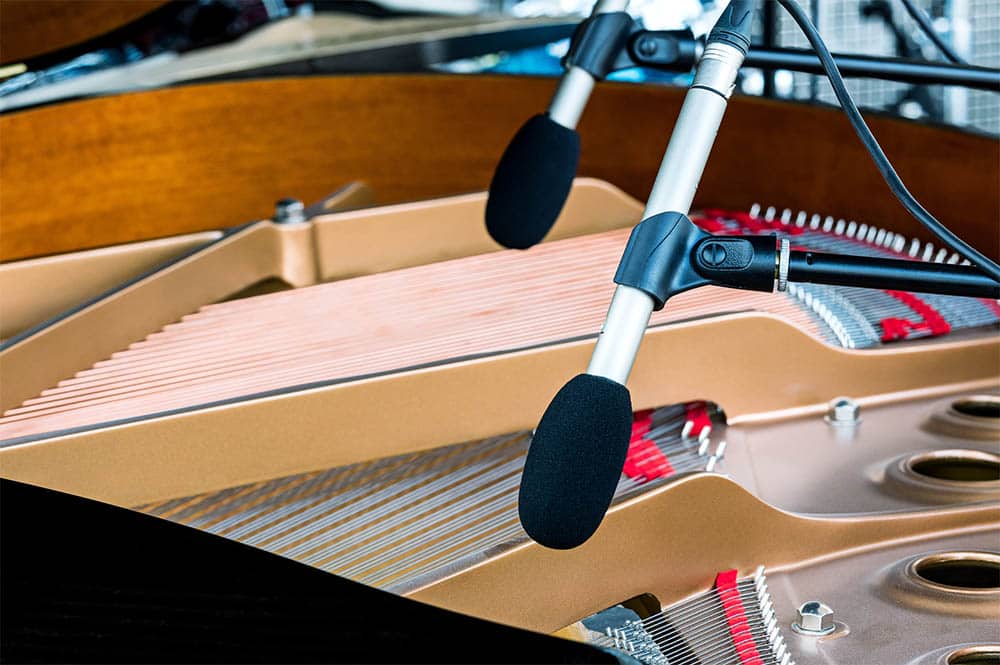
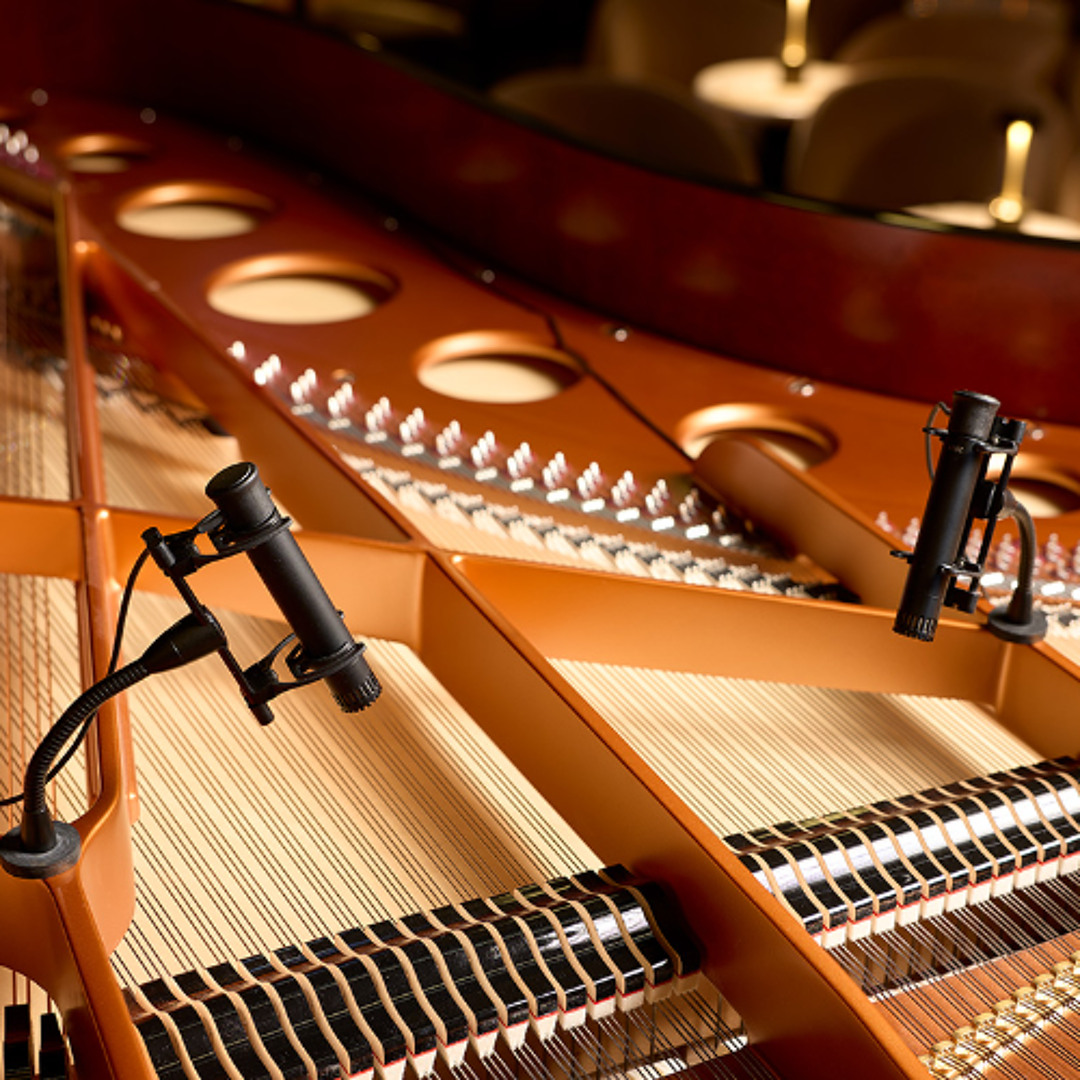
Place one microphone toward the bass strings and one toward the treble strings. This gives a wide stereo image and is easy to adjust.
Advantages:
- Wide left-to-right piano sound
- Clear separation between bass and treble
- Simple placement
Limitations:
- The image can become too wide
- Mono playback may change the tone
- Each microphone hears a different part of the instrument
Start with the microphones 8 to 16 inches above the strings and about 12 to 24 inches apart. These are starting points, not fixed rules.
X/Y pair
Place two cardioid microphones close together, with their capsules near the same point and angled apart. X/Y gives a more compact stereo image than a spaced pair.
Advantages:
- Good mono compatibility
- Fewer phase problems
- Useful for broadcast, worship, and smaller stages
Limitations:
- Less wide than a spaced pair
- Placement changes the balance of the whole piano
- Requires matched or closely matched microphones
An X/Y pair often works well near the center of the piano, aimed toward the strings. Rotate the pair toward the bass or treble side to change the tonal balance.
ORTF pair
ORTF uses two cardioid microphones with a moderate spacing and angle. It can create a natural stereo image with more width than X/Y.
Advantages:
- Natural stereo depth
- Wider image than X/Y
- Good detail and separation
Limitations:
- Needs more space
- Can have more phase change than X/Y
- May sound uneven in mono if placement is poor
For live work, use ORTF only when you can keep the microphones secure and away from the pianist’s hands and head.
Step 3: Start over the strings, not deep inside the piano
A useful starting position is above the strings, between the hammers and the curve of the lid. Aim the microphones toward the soundboard or bridge area, depending on the tone you want.
Do not assume that placing the microphones as close as possible will sound best. Very close placement can produce:
- Excessive hammer attack
- Uneven notes
- Too much mechanical noise
- A narrow or unnatural tone
- Strong proximity effect with directional microphones
Raise the microphones if the sound is harsh. Move them closer if the piano is weak or the stage is noisy.
Step 4: Balance bass and treble
The bass side can sound thick and powerful. The treble side can sound bright and sharp. Start with equal microphone height, then adjust based on the piano and player.
Try these changes:
- Too much bass: Move the bass microphone away from the lower strings or reduce low-mid EQ.
- Too much hammer noise: Raise the microphones or aim them away from the hammers.
- Too much treble: Move the treble microphone toward the center or lower it slightly.
- Weak bass: Move the bass microphone closer to the lower strings or point it toward the bridge.
- Uneven stereo image: Bring the microphones closer together or use X/Y.
The bridge is a useful reference point, but it is not a magic target. Every piano has a different soundboard, string layout, lid, and condition.
How to Mic an Upright Piano
An upright piano radiates sound from several areas. The soundboard is behind the instrument, while the strings and hammers face forward. The best position depends on the cabinet design, wall distance, stage volume, and desired sound.
Option 1: Place microphones behind the upright
If you can safely access the back of the piano, place one microphone near the upper soundboard and another near the lower soundboard.
Start with:
- One cardioid microphone near the upper half
- One cardioid microphone near the lower half
- The capsules about 4 to 12 inches from the soundboard
- The microphones aimed toward the soundboard, not directly at the cabinet frame
This position can produce a full, natural sound. It may also capture more low-frequency resonance and mechanical noise than a front-facing position.
Do not push the microphones against the soundboard. Leave room for the player and piano hardware. Secure the stands so they cannot fall if someone moves the piano.
Option 2: Place microphones above the open top
Open the top panel if the piano allows it. Place one microphone toward the bass side and one toward the treble side.
This setup is often practical for live stages because the microphones remain visible and accessible. It may sound brighter than a rear placement because the microphones hear more direct hammer and string sound.
Lower the microphone angle if the piano sounds too sharp. Move the microphones farther from the opening if they capture too much mechanical noise.
Option 3: Use one microphone at the front
One microphone can work when the mixer has limited channels or when the piano is mainly a supporting instrument.
Place a cardioid microphone above the keyboard area or near the upper front panel. Aim it toward the strings rather than directly at the pianist.
This method is simple, but it may not capture the full bass range. A single microphone also gives you less control over the bass and treble balance.
Do not place the upright against the wall by default
A wall can reinforce low frequencies and make an upright piano sound boomy. It can also make rear microphone placement difficult.
If the piano must sit near a wall:
- Start with microphones above the piano.
- Use a high-pass filter carefully.
- Check the 150 to 300 Hz range for excess buildup.
- Listen from the audience area, not only through headphones.
- Ask the pianist whether the piano feels too loud or too dull.
The exact effect depends on the room, wall surface, piano, and distance. Do not use a fixed EQ preset for every upright piano.

How to Reduce Feedback
Feedback happens when sound from a speaker or monitor re-enters a microphone, becomes louder in the system, and repeats. A piano can be difficult to control because it needs a wide frequency range and often sits near stage monitors.
The most effective solution is microphone placement, not extreme EQ.
Use directional microphones
Cardioid microphones reject more sound from the rear than from the front. Point the microphone’s least sensitive area toward the nearest monitor.
Supercardioid and hypercardioid microphones can reject sound from a narrower area, but their rear pickup pattern is different. Place the monitor where the microphone has its strongest rejection. Check the microphone’s polar pattern rather than guessing.
Keep monitor speakers out of the pickup area
If possible:
- Place wedge monitors in front of the piano and aim them toward the performer.
- Avoid pointing a monitor into the open lid of a grand piano.
- Keep the piano microphones away from the main PA speakers.
- Use in-ear monitors when appropriate.
- Reduce monitor level before raising the piano channel.
A grand piano lid can reflect sound into the microphones. Lowering or adjusting the lid may help, but it can also change the piano’s tone.
Use a high-pass filter
A high-pass filter removes very low frequencies while allowing the useful piano range to remain. The starting point depends on the piano, microphone, room, and mix.
Try a gentle filter around 40 to 80 Hz, then listen. Do not remove low frequencies simply because the piano sounds large in headphones. The room may need less low end than the solo sound.
Cut narrow problem frequencies carefully
If the piano rings at one frequency, use a narrow EQ cut. Make small changes and bypass the EQ to confirm that the cut helps.
Common problem areas can include:
- Low rumble from the stage
- Low-mid buildup from the soundboard
- Harsh hammer attack in the upper mids
- Ringing caused by room reflections
Do not boost frequencies to fix a feedback problem. First lower the offending band or change the microphone and monitor positions.
Ring out the system safely
A trained engineer can raise the monitor level slowly until a frequency begins to ring, then make a small cut. Keep people away from the speakers while testing, and avoid sudden high-level bursts.
High sound levels can harm hearing. Wear hearing protection when working near loud PA systems, and never place your ear close to a speaker to find feedback.
How to Set Gain and EQ
Set gain and EQ after the microphones are in their performance position. A piano can sound balanced in an empty room and too boomy once the audience arrives.
Set the preamp gain
Ask the pianist to play the loudest part of the song. Set the preamp so the mixer has healthy level without clipping.
Leave headroom for hard playing. The exact meter target varies by console, but the channel should remain comfortably below its clip point during the loudest notes.
Use the pad switch only when the microphone or preamp overloads. A pad can lower the incoming signal, but it does not solve poor placement or feedback.
Start with no EQ
Listen to the piano with the EQ bypassed. Ask:
- Is the piano too dark or too bright?
- Is the bass full or boomy?
- Can you hear the hammer attack?
- Does the piano mask the vocal?
- Does the stereo image stay stable in mono?
- Does the sound change greatly when the pianist moves?
If the raw sound is close, use gentle EQ. Heavy processing often makes a live piano less natural.
Common EQ moves
Use these as problem-solving ideas, not fixed settings:
| Symptom | Possible cause | First change |
|---|---|---|
| Boomy low end | Room, wall, or soundboard buildup | Move the mic; try a gentle high-pass filter |
| Muddy mix | Too much low-mid energy | Make a small cut in the low-mid range |
| Harsh attack | Mic aimed at hammers | Raise or angle the microphone away from the hammers |
| Dull piano | Mic too far away or aimed at the cabinet | Move it toward the strings or soundboard |
| Thin piano | Too much filtering or poor phase relationship | Check polarity, spacing, and low-frequency EQ |
| Uneven bass and treble | Poor stereo placement | Reposition the microphones before using EQ |
Avoid boosting the top end to add detail until you have checked microphone angle. A small change in angle can sound more natural than a large treble boost.
Use compression with restraint
Compression can keep the piano from jumping out of the mix. Start with a low ratio and a medium attack so the initial note remains clear.
Too much compression can:
- Raise pedal and bench noise
- Make room bleed more obvious
- Flatten the player’s dynamics
- Increase feedback risk
- Make the piano sound small or dull
A piano often needs less compression when the player already controls dynamics well.

How to Check Phase and Mono Compatibility
Two piano microphones can sound wide in stereo but thin in mono if their signals interfere. This is a phase relationship problem.
The issue often appears when microphones are spaced at different distances from the strings. Some frequencies arrive at the mixer at slightly different times. When combined, those frequencies can weaken or disappear.
Check the piano in mono
After setting the stereo mix:
- Listen in stereo.
- Sum the piano to mono.
- Compare the bass, body, and attack.
- Reverse the polarity of one channel if your console allows it.
- Keep the position that sounds fuller and more stable.
- If neither position works, move the microphones closer together.
Polarity reversal does not fix every phase problem. It changes the direction of the waveform, but it cannot correct all timing differences.
Use the three-to-one guideline as a starting point
When using separate microphones, placing one microphone at least three times farther from the other microphone than each microphone is from its sound source can reduce some leakage and phase problems. This is a starting guideline, not a rule for every piano setup.
A coincident X/Y pair usually gives stronger mono compatibility because the capsules are close together. A spaced pair can sound wider, but it needs more careful checking.

Choosing the Right Microphone Type
The microphone type changes both the sound and the amount of stage noise that enters the mix.
Small-diaphragm condenser microphones
These are often a strong choice for acoustic piano because they can capture detail and transients clearly.
They fit best when:
- The stage is reasonably quiet
- You want a detailed stereo sound
- The microphones can receive phantom power
- You can control monitor spill
Their sensitivity can be a disadvantage on a loud stage.
Large-diaphragm condenser microphones
These can produce a full, polished sound and may capture more room character. They are useful when the piano is featured and the stage is quiet.
They may be less convenient when:
- Space inside the piano is limited
- The stage has heavy drum or guitar spill
- Feedback margin is small
- The piano must remain visually clear
Dynamic microphones
Dynamic microphones can work well when stage volume is high. They are often less sensitive to distant sound, though the result depends on the exact model and placement.
They may need more preamp gain. Listen for noise before adding large amounts of gain.
Ribbon microphones
Ribbon microphones can offer a smooth top end, but they require care. Some have low output, some are fragile, and their phantom-power requirements differ by design.
Use a ribbon only when:
- You know the exact model’s power requirements
- The microphone can be placed safely
- The stage is quiet enough
- The mixer has suitable gain
For a fast live setup, a durable condenser or dynamic microphone is usually easier to manage.
Stereo or Mono: Which Should You Use?
Choose stereo when the piano is a featured instrument and the audience can benefit from width. Choose mono when the piano must remain centered, the PA is narrow, or feedback control is the main concern.
Stereo works well when:
- The piano has a clear role in the arrangement
- The stage is quiet
- The microphones can remain stable
- The PA spreads sound evenly across the audience
- The mix can handle left-to-right movement
Mono works well when:
- The piano supports a vocal or small band
- The venue has a simple PA
- The piano is near a loud monitor
- The audience sits far off-axis
- The engineer needs fast control
Stereo does not always sound wider or better to every listener. Some people may hear only one side of a stereo image, especially in a wide room. A carefully placed mono microphone can produce a more consistent result.
Common Problems and Fast Fixes
Use the symptom to guide the next change. Change one thing at a time so you know what helped.
The piano sounds harsh
Possible causes include microphones aimed at the hammers, microphones placed too close, or too much upper-mid energy from the room.
Try:
- Raise the microphones.
- Aim them slightly away from the hammers.
- Move the treble microphone toward the center.
- Lower the lid position if the stage allows it.
- Make a small upper-mid cut only after repositioning.
The piano sounds muddy
Muddiness often comes from low-mid buildup, a wall behind an upright, or too much soundboard resonance.
Try:
- Move the microphone away from the lower soundboard.
- Reduce low-mid energy with a small EQ cut.
- Use a gentle high-pass filter.
- Move the upright farther from the wall if practical.
- Check whether the bass microphone is too close.
The piano sounds thin
Thin sound can result from phase cancellation, excessive filtering, or a microphone aimed at the wrong part of the instrument.
Try:
- Check the two channels in mono.
- Test polarity reversal on one channel.
- Move spaced microphones closer together.
- Restore some low-frequency content.
- Aim one microphone toward the bridge or soundboard.
The piano feeds back when the player gets loud
Do not solve this by simply turning down the piano if the performer needs more level.
Try:
- Lower the monitor level.
- Move the monitor away from the microphone’s sensitive area.
- Change the microphone angle.
- Use a more directional microphone.
- Apply a narrow cut to the ringing frequency.
- Lower the grand piano lid position if safe.
- Use in-ear monitoring when suitable.
The stereo image feels unstable
The image may shift because the microphones are too far apart, the pianist changes dynamics across the keyboard, or the room distributes sound unevenly.
Try an X/Y pair or bring a spaced pair closer together. Check the mix from several audience positions, not only the mix position.
A Reliable Live Soundcheck Process
A short, repeatable soundcheck is more useful than random microphone movement.
Before the pianist arrives
- Place stands and cables safely.
- Confirm the piano lid position.
- Connect microphones with the mixer muted.
- Turn on phantom power only if required.
- Label the channels.
- Set the initial pan positions.
- Keep EQ and compression bypassed.
During the check
Ask the pianist to play:
- Soft notes in the low register
- Loud chords in the low register
- Soft notes in the high register
- Loud chords in the high register
- A full song section
- Pedal changes
- The loudest passage in the set
Listen in the audience area. Headphones are useful for finding noise, but the room tells you whether the piano fits the PA.
Before the show
- Check the piano in mono.
- Walk the room while the pianist plays.
- Confirm that no cable can be tripped over.
- Make sure the lid and microphone stands are stable.
- Save the console scene if the system supports it.
- Keep a backup plan, such as one working microphone and one spare cable.
A successful setup has a clear piano tone, enough gain before feedback, stable stereo or mono coverage, and no interference with the performer.
Key Takeaways
- Start with microphone placement, not EQ.
- Use a stereo pair inside a grand piano when width and detail matter.
- Use the upper and lower soundboard areas of an upright piano as starting points.
- Keep microphones away from hammers if the attack sounds harsh.
- Check every stereo setup in mono.
- Use directional patterns and careful monitor placement to reduce feedback.
- Make small EQ changes only after the physical setup works.
- Secure all stands and cables before the performance.
- The best position depends on the piano, room, player, PA, and stage volume.
FAQs
Can I use one microphone to mic a piano live?
Yes. One microphone can work well when the piano is a supporting instrument or when the mixer has limited channels. Place it near the middle of the useful sound area, then move it toward the bass or treble side to adjust the balance.
Should piano microphones point at the strings or the soundboard?
Either can work. Pointing toward the strings often gives more attack and detail. Pointing toward the soundboard often gives more body. Start with the strings and adjust the angle if the sound is too bright or thin.
Should I mic a grand piano with the lid open or closed?
An open lid usually gives more direct sound and level. A lower or closed lid can reduce stage spill and feedback. Use the safest lid position allowed by the piano and venue, then adjust microphone placement around it.
Is a direct box useful for an acoustic piano?
A direct box is useful for an electric piano, digital piano, or piano pickup system. A standard acoustic piano does not produce an electrical signal by itself, so it normally needs microphones or a properly installed pickup.
Do I need two microphones for stereo piano?
No. Two microphones give you stereo control, but one well-placed microphone can sound clearer and more consistent across a room. Use two only when the stereo benefit is greater than the added phase and feedback risk.
How close should the microphones be to a piano?
For a grand piano, begin about 8 to 16 inches above the strings. For an upright, begin about 4 to 12 inches from the soundboard or upper opening. Treat these as starting points and adjust by ear.
Conclusion
To mic a piano for live sound, place the microphone where the instrument already sounds balanced, then manage the stage around it. A grand piano often benefits from a carefully placed stereo pair, while an upright can work with microphones behind the cabinet or above the open top.
Check the sound in the room, test the mix in mono, and fix feedback with placement before reaching for aggressive EQ. The next practical step is to record a short soundcheck with two or three microphone positions, then compare those recordings from the audience area.