

A mini microphone converts sound into an electrical signal through a tiny diaphragm and sensor.
If you have ever wondered how does mini microphone work inside a phone, camera, lapel, or wireless system, the answer involves simple physics and smart electronics. This guide explains the parts, signal path, microphone types, sound quality limits, and practical setup tips in clear terms.
How Does Mini Microphone Work?
A mini microphone works by turning air movement into an electrical signal. When you speak, your voice creates pressure waves in the air. These waves move a very small diaphragm inside the microphone.
The diaphragm acts like a tiny drum. As it moves back and forth, it changes an electrical property. The microphone then sends that change to a recording device, mixer, phone, camera, or transmitter.
The basic process looks like this:
- Your voice creates sound waves.
- Sound waves move the microphone diaphragm.
- A sensor changes that movement into an electrical signal.
- The signal is boosted, processed, stored, or transmitted.
- A speaker or headphones turn the signal back into sound.
This is the core answer to how does mini microphone work. The microphone does not “understand” words. It only captures changes in air pressure. Software or recording equipment later processes those changes into usable audio.
A mini microphone may be small, but it still needs the same basic parts as a larger microphone:
• A diaphragm that reacts to sound
• A sensing element that detects diaphragm movement
• A circuit that creates or conditions the audio signal
• A connector, battery, or wireless transmitter
• A protective grille and housing
Most compact microphones use either a condenser design or a dynamic design. Small lavalier and phone microphones usually use electret condenser technology because it offers good sensitivity in a very small package.

The Main Parts Inside a Mini Microphone
Understanding the parts makes it easier to see how does mini microphone work in real situations. Each component has a specific job, much like parts in a small camera or watch.
Diaphragm
The diaphragm is a thin membrane that moves when sound reaches it. It may be made from a light plastic film, metal-coated material, or another flexible substance.
A lighter diaphragm can respond quickly to small changes in sound. This helps the microphone capture speech detail, music, and high tones. However, a very sensitive diaphragm can also pick up clothing noise, wind, or handling sounds.
Backplate or Coil
The part behind the diaphragm depends on the microphone type. In a condenser microphone, a fixed backplate sits close to the diaphragm. Together, they form a small capacitor.
In a dynamic microphone, the diaphragm connects to a tiny voice coil. The coil moves inside a magnetic field and produces an electrical signal.
Capsule
The capsule is the sensing unit. It contains the diaphragm and the parts that detect its movement. In a mini microphone, the capsule is often only a few millimeters wide.
The capsule largely controls the microphone’s sensitivity, frequency response, and noise level. A low-cost capsule may sound thin or harsh, while a better capsule can produce clearer and more natural speech.
Circuit board
the circuit board supports the capsule and manages the signal. It may include a preamplifier, filter, analog-to-digital converter, wireless chip, or noise-control system.
Digital mini microphones often convert sound inside the microphone itself. Analog models send a changing electrical signal to the connected device for further processing.
Port, Cable, or Wireless Transmitter
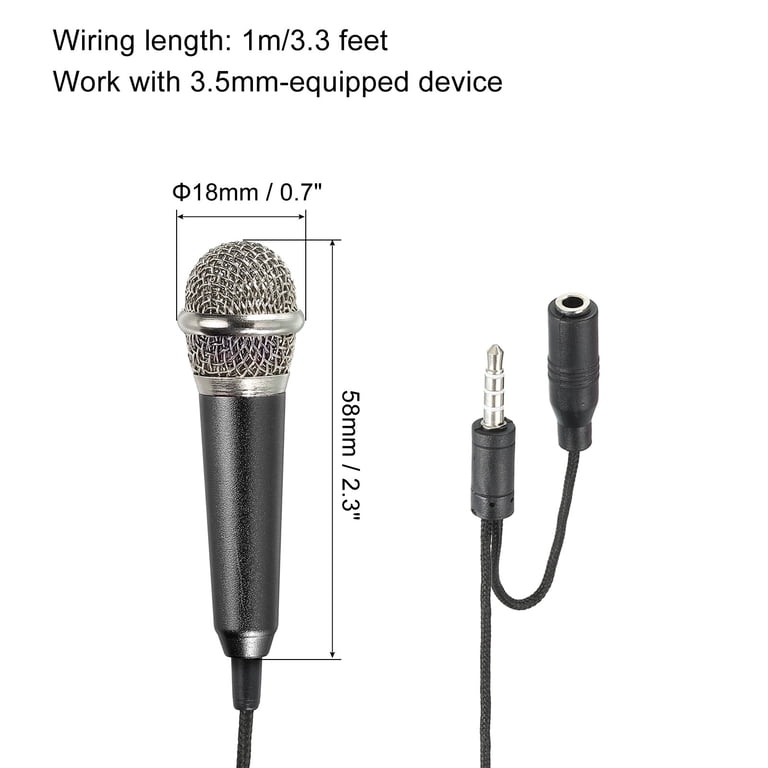
A wired mini microphone may use a 3.5 mm plug, USB connector, TRRS plug, or professional connector. A wireless model sends audio through radio signals, often using Bluetooth or a dedicated wireless frequency.
The connection type matters. A microphone can work well but still sound poor if the plug, adapter, phone, or camera does not support the correct wiring.

How a Condenser Mini Microphone Works
Most tiny microphones in smartphones, laptops, earbuds, and clip-on lavalier systems are condenser microphones. This design uses changes in electrical capacitance to detect diaphragm movement.
The diaphragm and backplate form two sides of a capacitor. When sound moves the diaphragm, the distance between these parts changes. That changes the capacitance and creates a signal that matches the sound wave.
Electret condenser microphones contain a permanently charged material. This means they do not need a separate high-voltage power supply for the capsule. They still need a small amount of power for the internal transistor and circuit.
This explains how does mini microphone work in many everyday devices:
- Sound moves the diaphragm.
- The diaphragm changes the distance from the backplate.
- Capacitance changes inside the capsule.
- An internal transistor turns that change into a voltage signal.
- The device amplifies or converts the signal.
Condenser microphones are popular because they are small and sensitive. They can capture quiet speech from a short distance. Their weakness is that they may pick up unwanted sounds more easily than less sensitive microphone types.

How a Dynamic Mini Microphone Works
A dynamic mini microphone uses electromagnetic induction. Its diaphragm connects to a small coil that sits inside a magnetic field.
When sound moves the diaphragm, the coil moves too. This movement creates a small electrical current. The current follows the shape of the sound wave.
Dynamic microphones are usually strong and resistant to loud sound. They also tend to reject some quiet background noise when used close to the speaker. However, making a dynamic microphone very small can reduce its sensitivity and low-frequency response.
Small dynamic microphones are less common in phones and tiny wireless systems. They are more common in compact communication equipment, intercoms, headsets, and some specialized recording devices.
The main difference is simple:
• Condenser microphones use capacitance changes.
• Dynamic microphones use movement in a magnetic field.
• Both designs convert sound pressure into an electrical signal.

How a Mini Microphone Creates Digital Audio
A microphone may create an analog signal first. A digital device then uses an analog-to-digital converter, or ADC, to turn that signal into numbers.
The ADC measures the voltage many times each second. These measurements become digital audio data. The device can then save, edit, compress, or transmit the recording.
Two specifications matter here:
Sample Rate
Sample rate tells you how many measurements the system takes each second. Common rates include 44.1 kHz and 48 kHz.
A higher sample rate can capture a wider range of frequencies. For speech, standard sample rates are usually enough. A higher number does not automatically mean better sound if the capsule or room is poor.
Bit Depth
Bit depth describes how precisely the system records each measurement. Sixteen-bit and 24-bit audio are common choices.
Greater bit depth can provide more room between quiet and loud signals. It may also reduce quantization noise. Still, microphone placement and room noise often matter more than bit depth in everyday recording.
This digital stage is an important part of how does mini microphone work with phones, computers, cameras, and USB audio devices. The capsule captures the sound, while the converter prepares it for modern digital equipment.
How Wireless Mini Microphones Work
A wireless mini microphone combines a microphone capsule with a transmitter. The capsule captures your voice, and the transmitter sends the audio to a receiver.
The receiver connects to a phone, camera, computer, or audio mixer. Some systems use Bluetooth, while others use a dedicated radio link. Professional wireless systems often use a separate transmitter and receiver because they can provide lower delay and more stable performance.
A typical wireless signal path is:
- The capsule captures your voice.
- A preamplifier raises the signal level.
- The transmitter converts or encodes the audio.
- A radio signal carries the audio to the receiver.
- The receiver decodes the signal.
- The receiving device records or plays the audio.
Wireless systems bring freedom, but they also add possible problems. Battery level, distance, walls, radio interference, and software settings can affect performance.
Bluetooth microphones may also introduce a small delay. That delay can be acceptable for calls but distracting for video recording. A dedicated wireless system often performs better for interviews, presentations, and content creation.

Why Mini Microphones Sound Different
Knowing how does mini microphone work does not fully explain sound quality. The microphone’s design and recording environment also shape the final result.
Microphone Placement
Distance has a major effect on sound. A microphone close to your mouth usually captures a stronger voice and less room noise. A microphone placed too close may produce popping sounds or excessive bass.
For a lavalier microphone, place it about six to eight inches below your mouth. Keep it away from necklaces, zippers, hair, and loose fabric.
Polar Pattern
The polar pattern describes where the microphone hears sound best.
• Omnidirectional microphones pick up sound from many directions.
• Cardioid microphones focus mainly on the front.
• Supercardioid microphones have a tighter front focus.
• Directional patterns can reduce some sound from the sides and rear.
Many tiny lavalier microphones are omnidirectional. This helps maintain a steady voice level when the speaker turns their head.
Frequency Response
Frequency response shows how strongly a microphone captures different pitches. A speech microphone may boost the midrange to improve clarity.
Some mini microphones reduce very low frequencies to limit traffic rumble, air conditioning, and handling noise. Others add a small high-frequency boost to make speech sound brighter.
Sensitivity
Sensitivity tells you how much signal the microphone produces from a given sound level. High sensitivity can help capture quiet voices, but it can also expose room noise.
A microphone with lower sensitivity may need more gain. Too much gain can raise hiss, especially with inexpensive audio equipment.
Benefits of Using a Mini Microphone
Mini microphones are useful because they balance size, convenience, and performance. They fit into places where a full-size microphone would be awkward.
Common benefits include:
• Hands-free recording for interviews and presentations
• Better speech clarity than many built-in phone microphones
• Easy use with cameras, tablets, and computers
• Low weight for travel and mobile video
• Discreet placement on clothing or equipment
• Support for live streams, video calls, podcasts, and lessons
A small microphone can also improve consistency. A phone placed several feet away may record a weak voice with lots of room sound. A clip-on microphone stays closer to the speaker, so the voice remains more direct.
That does not mean every mini microphone is automatically better. A poorly placed microphone can sound worse than a good built-in microphone. The whole setup matters.

Limitations and Common Problems
Mini microphones have clear advantages, but they also have limits. Their small size leaves less room for large diaphragms, strong shielding, and advanced electronics.
Common problems include:
Clothing Noise
A clip-on microphone can rub against a shirt or jacket. This creates loud rustling that is difficult to remove completely.
Use a small clip, foam cover, or mounting tape. Leave enough space between the microphone and fabric that moves.
Wind Noise
Outdoor air can overload the diaphragm. A foam windscreen helps with light airflow. For stronger wind, use a furry wind cover designed for the microphone.
Electrical Noise
Buzzing may come from poor cables, nearby power supplies, or ground-loop problems. Test the microphone with another cable and device to locate the cause.
Compatibility Issues
A TRRS plug used by a phone may not work correctly with a camera. Some devices need a special adapter or plug-in power.
Before recording, check whether the microphone is designed for your device. This simple step prevents many silent or one-sided recordings.
Battery Failure
Wireless mini microphones depend on batteries. A low battery can cause dropouts, distortion, or a complete loss of audio.
Charge the transmitter and receiver before important work. Carrying a backup cable or second microphone is wise for interviews and live events.
How to Use a Mini Microphone Correctly
If you are learning how does mini microphone work, a short setup routine can make a large difference.
- Connect the microphone to the correct input.
- Confirm that the device recognizes the microphone.
- Place the microphone near the speaker’s chest.
- Keep the capsule clear of hair and clothing.
- Set the input level so normal speech peaks below clipping.
- Record a short test.
- Listen with headphones before starting the real session.
Avoid setting the gain too high. Clipping happens when the signal is too loud for the input. Once clipped, the recording may sound harsh and broken, and lowering the volume later will not fully repair it.
I recommend recording ten seconds of room tone before an interview or video. This gives you a reference for background noise and helps reveal problems that may not be obvious while monitoring.
A common mistake is testing only the microphone itself. Test the complete chain, including the adapter, cable, camera, phone app, wireless receiver, and headphones.
Mini Microphone vs. Built-In Microphone
A built-in microphone is convenient, but it may sit far from your mouth. This distance allows room reflections, keyboard noise, fans, and nearby conversations to compete with your voice.
A mini microphone can sit closer to the speaker. This usually improves the voice-to-noise ratio, which means the voice is stronger compared with unwanted sound.
A built-in microphone may still be the better choice when:
• You need a fast, simple setup.
• You are recording in a quiet room.
• The external microphone is not compatible.
• You want to avoid visible cables or clothing noise.
For interviews, online teaching, social videos, and presentations, a well-placed mini microphone often provides a clearer result. The improvement comes mainly from placement, not just from the microphone’s size.
How to Choose a Mini Microphone
Choose a microphone based on your device, environment, and purpose. A cheap microphone can work well in a quiet room, while an expensive model may struggle if it is placed near noisy clothing.
Consider these points:
• Device compatibility: Check the connector and required adapter.
• Microphone type: Condenser models are common for speech and mobile use.
• Pickup pattern: Choose omnidirectional for natural movement or directional for focused sound.
• Wired or wireless design: Wired models avoid battery and radio problems.
• Monitoring: A headphone output helps you hear problems before recording.
• Wind protection: Outdoor use requires a suitable windscreen.
• Build quality: A strong clip and flexible cable improve daily use.
• Warranty and support: Reliable support matters for wireless systems.
Read technical specifications, but do not judge sound by numbers alone. A frequency chart cannot tell you how the microphone will sound in your room or on your voice.
Frequently Asked Questions About How Does Mini Microphone Work
How does a mini microphone work with a phone?
A mini microphone captures sound and sends an electrical or digital signal through the phone’s compatible port or wireless connection. The phone’s recording app then processes and stores that signal as audio.
Does a mini microphone need power?
Many small condenser microphones need power for their internal electronics. They may receive power from a phone, camera, USB port, battery, or wireless transmitter.
Why does my mini microphone sound muffled?
Muffled audio can result from blocked openings, poor placement, clothing contact, or an incorrect device setting. Move the microphone closer, clear the capsule, and check the input source before changing other settings.
Can a mini microphone reduce background noise?
A mini microphone can reduce background noise when it is placed close to the speaker. It does not remove all noise, and a noisy room, wind, or nearby machinery may still enter the recording.
Are wireless mini microphones better than wired ones?
Wireless models offer freedom of movement, while wired models are often simpler and more reliable. The better choice depends on your need for mobility, battery life, signal range, and delay.
Why does a mini microphone make static or buzzing sounds?
Static may come from a damaged cable, loose connection, radio interference, electrical equipment, or a low battery. Test each part of the setup separately to identify the source.
Conclusion
A mini microphone works by using a tiny diaphragm and sensor to turn air pressure changes into an electrical or digital signal. Condenser models use capacitance changes, while dynamic models use electromagnetic movement. The signal then travels through a cable or wireless system to a recording device.
Good placement, correct compatibility, suitable gain, and basic wind protection often matter more than price. Test your complete setup before recording, keep the microphone close to the speaker, and monitor the sound with headphones.
Now that you understand how does mini microphone work, choose a model that matches your device and recording space. Try these setup tips in your next call, video, interview, or podcast, and share your results or questions in the comments.