

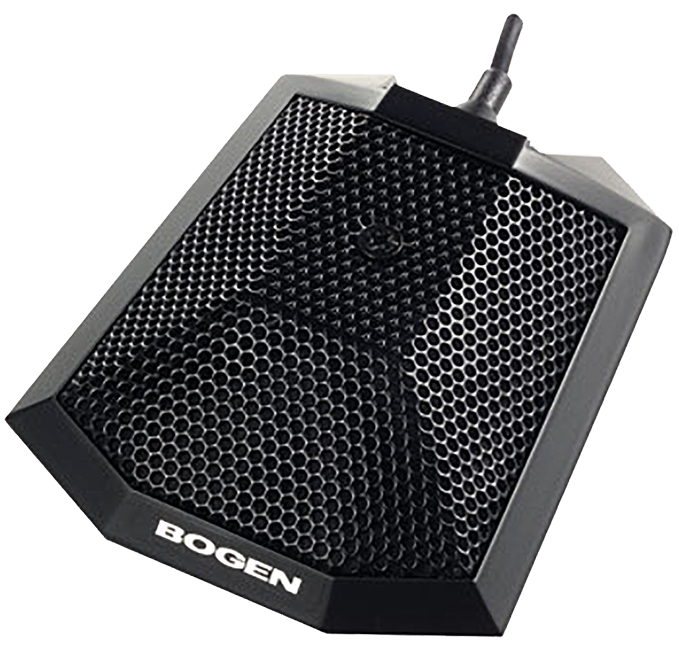
A boundary microphone is a small microphone designed to sit on a flat surface and capture nearby voices clearly.
If you have seen a slim microphone resting on a conference table, stage floor, or meeting-room desk, you have likely seen a boundary microphone. Its design uses the surface beneath it to reduce sound reflections and improve voice pickup. This guide explains what a boundary microphone is, how it works, where to place one, and when it is the right choice for your audio setup.
What Is a Boundary Microphone?
A boundary microphone is a microphone placed on, or very close to, a large flat surface. Common surfaces include tables, floors, walls, ceilings, and presentation platforms.
Unlike a handheld microphone, a boundary microphone does not need to be held close to the speaker. It is built to capture sound across a wider area while staying low and out of the way.
The name comes from the word “boundary.” In room acoustics, a boundary is a surface that changes how sound moves. When a microphone sits on that surface, the surface affects the sound waves before they reach the microphone capsule.
A boundary microphone is also called a pressure-zone microphone, or PZM, in some product descriptions. PZM is a specific design term, while boundary microphone is the broader category.
In simple terms, a boundary microphone acts like a quiet listener on a table. It picks up voices around it without creating a large visual or physical distraction.
How Does a Boundary Microphone Work?
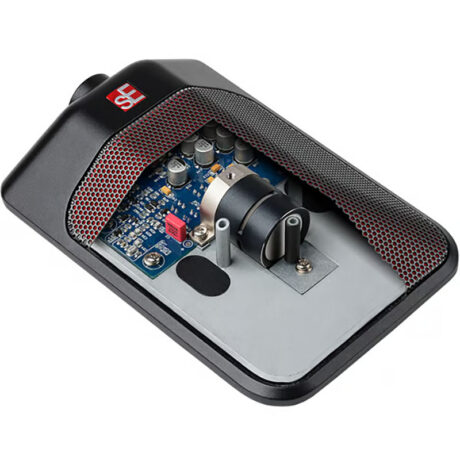
A boundary microphone uses a small microphone capsule placed close to a flat surface. The capsule may face upward or sit near the surface at a carefully chosen angle.
When sound reaches the table and the microphone at nearly the same time, some common reflection problems are reduced. This can create a cleaner sound than placing the same microphone a short distance above the table.
Here is the basic process:
- A person speaks across the room or table.
- Sound travels toward the microphone.
- The nearby surface changes the path of reflected sound.
- The microphone captures the direct voice and useful room sound.
- The connected audio system boosts, records, or transmits the signal.
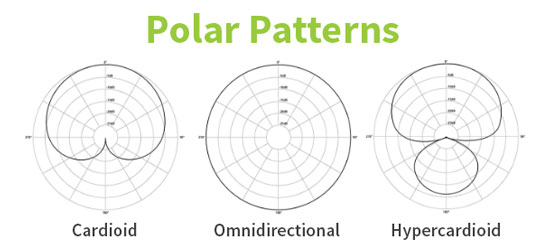
Many boundary microphones use an omnidirectional pickup pattern. This means they can hear sound from several directions. Some models use a cardioid or other directional pattern to focus more strongly on one area.
The pickup pattern matters. An omnidirectional boundary microphone can work well for several people around a table. A directional model may work better for a presenter, panel, or lecture.
A boundary microphone does not remove room noise. It can reduce some unwanted acoustic effects, but fans, keyboards, chairs, air conditioners, and nearby conversations may still be recorded.

Main Features of a Boundary Microphone
Boundary microphones vary widely. Some are simple analog microphones, while others include digital connections, automatic mixing, and advanced noise control.
Common features include:
Low-profile design
Most boundary microphones are thin and compact. They can sit on a conference table without blocking a speaker’s view.
This design also helps on a theater floor or worship platform. Performers can move around without stepping on a tall microphone stand.
Wide pickup area
Many boundary microphones hear voices across a broad area. This makes them useful for meetings, group discussions, and roundtable recordings.
The exact pickup range depends on room size, microphone sensitivity, speaker volume, and background noise.
Multiple pickup patterns
Some models offer different pickup patterns. A wide pattern can cover a group, while a directional pattern can focus on one speaker.
Always check the product specifications. Two microphones with similar shapes may capture sound in very different ways.
Cable or wireless operation
A wired boundary microphone often connects to a mixer, audio interface, camera, or conference system. Wireless models may connect through a receiver or a digital wireless system.
Wired models usually offer stable power and a reliable signal. Wireless models offer more freedom but require battery checks and careful frequency planning.
Built-in controls
Some conference boundary microphones include mute buttons, status lights, automatic gain control, or touch controls. These features can make meetings easier to manage.
A simple recording microphone may have none of these controls. That is not a weakness if you already use a mixer or audio interface.

Where Are Boundary Microphones Used?
A boundary microphone fits many situations where several people need to speak without passing around a microphone.
Common uses include:
• Conference rooms for in-person and online meetings
• Boardrooms for group discussions
• Courtrooms and legal proceedings
• Classrooms and training rooms
• Theater stages and performance floors
• Houses of worship
• Podcast tables with several guests
• Press conferences and panel discussions
• Video calls with several people
• Recording rooms for acoustic instruments
In a meeting room, one boundary microphone may cover a small group. A larger room may need several microphones placed with enough space between them.
In theater, a boundary microphone can capture dialogue from actors who move across a stage. The microphone stays nearly invisible, which helps preserve the visual design.
For panel discussions, boundary microphones can sound natural because speakers do not need to lean toward a microphone stand. However, the room must be quiet enough for the microphone to separate speech from background noise.

Benefits of a Boundary Microphone
A boundary microphone offers several practical benefits.
It saves space
A boundary microphone does not require a tall stand. This leaves more room for laptops, papers, cameras, and other equipment.
It looks clean
Its low profile makes it easy to hide in professional spaces. This matters in corporate rooms, classrooms, broadcast sets, and live performances.
It can cover several speakers
One well-placed boundary microphone may capture a small group. This is often more convenient than giving each person a separate handheld microphone.
It can reduce some reflections
When placed correctly, a boundary microphone can produce a more even sound than a microphone floating above a hard table.
It supports hands-free speaking
People can talk naturally without holding equipment. This helps during meetings, presentations, and group discussions.
It can provide natural room sound
For stage or ensemble recording, a boundary microphone can capture a wide and realistic sound field. The result may feel more open than a close microphone.
A practical lesson from hands-on audio testing is that placement often matters more than price. A modest microphone placed well can outperform an expensive microphone placed beside a laptop fan or a loud air vent.
Limitations of a Boundary Microphone
A boundary microphone is useful, but it is not perfect for every job.
It may capture room noise
Because it often hears a wide area, it may pick up typing, paper movement, HVAC noise, and side conversations.
It may capture table noise
Tapping fingers, moving cups, and sliding laptops can travel through the table. Some models include shock isolation, but no microphone can eliminate every vibration.
It may produce feedback
In a live sound system, speakers can create feedback if the microphone hears amplified sound from nearby loudspeakers.
To reduce this risk:
• Keep loudspeakers in front of the microphone’s least sensitive area.
• Lower unnecessary gain.
• Use directional models when suitable.
• Keep the microphone away from reflective corners.
• Use acoustic treatment when the room is highly live.
It may not suit one distant speaker
If one person is speaking from far away, a boundary microphone may sound quiet or distant. A headset, lavalier, or close directional microphone may work better.
It needs careful spacing in large rooms
Several boundary microphones placed too close together can create phase problems and uneven sound. An audio technician may need to use automatic mixing or microphone gating.
These limits do not make a boundary microphone a poor choice. They simply show why the room, speaker distance, and audio goal must guide the purchase.
Boundary Microphone Placement Tips
Good placement can make a major difference.
Start by placing the boundary microphone near the center of the speaking area. For a round table, the center often works well. For a rectangular table, you may need one microphone for each group of speakers.
Keep the microphone away from:
• Laptop cooling fans
• Projectors
• Air vents
• Coffee machines
• Loudspeaker cabinets
• Table edges that receive bumps
• Walls and corners that create strong reflections
Do not cover the microphone with folders, papers, or decorative objects. These items may block sound or create rubbing noise.
For a conference room, ask people to face the microphone when possible. An omnidirectional model gives more freedom, but distance still affects voice clarity.
For a stage, test the microphone while performers walk through the full performance area. A boundary microphone may work well in one part of the stage but sound weak in another.
One common mistake is placing the microphone too close to the edge of a table. The edge can create an uneven acoustic response, and people may bump the unit or its cable.
Boundary Microphone vs. Other Microphones
Understanding the differences helps you choose the right tool.
Boundary microphone vs. lavalier microphone
A lavalier microphone clips to a person’s clothing. It gives that speaker a consistent distance from the microphone.
A boundary microphone can cover several people, but it may capture more room sound. A lavalier is often better for a solo presenter who moves around.
Boundary microphone vs. shotgun microphone
A shotgun microphone uses a narrow pickup pattern. It is designed to focus on sound from one direction.
A boundary microphone usually covers a wider area. A shotgun microphone may work better for a single speaker, but it can sound poor indoors if room reflections reach the capsule.
Boundary microphone vs. handheld microphone
A handheld microphone is placed close to the mouth. This gives strong voice level and good control over background noise.
A boundary microphone is more convenient for group speaking. A handheld microphone is often better for loud stages, interviews, and noisy environments.
Boundary microphone vs. ceiling microphone
A ceiling microphone sits above the room and captures people below it. It can provide a clean table surface and flexible room layout.
A boundary microphone is easier to install and usually costs less. It may also produce a stronger signal because it sits closer to the speakers.
Boundary microphone vs. conference speakerphone
A conference speakerphone combines microphones, speakers, processing, and call controls. A boundary microphone may be only one part of a larger audio system.
A dedicated boundary microphone can offer better control when connected to a mixer, computer, or professional conferencing system.
How to Choose a Boundary Microphone
Consider the room and the task before looking at brand names.
1. Count the speakers
A small group may need one microphone. A long table may need two or more. Too few microphones force people to speak loudly or lean forward.
2. Measure the room
A large room needs more careful planning than a small office. Check the microphone’s stated pickup range, but treat it as a guide rather than a promise.
3. Check the pickup pattern
Choose omnidirectional pickup for group conversations when the room is quiet. Choose directional pickup when you want stronger focus on one area.
4. Check the connector
Common connections include XLR, USB, 3.5 mm, and specialized conference-system connections. Make sure your mixer, computer, or camera supports the chosen connector.
5. Consider phantom power
Some professional boundary microphones use phantom power from a mixer or audio interface. Confirm that your equipment can provide the required voltage.
6. Look for shock isolation
Shock isolation can reduce noise from table bumps and cable movement. It is especially helpful in conference rooms and recording spaces.
7. Check mute and control features
For online meetings, a mute button and clear status light can prevent awkward mistakes. For studio recording, you may prefer a simple microphone with controls handled by the engineer.
8. Review frequency response
A microphone with a balanced speech response can improve clarity. Avoid choosing only by a wide frequency range, since room noise and placement often matter more.
How to Set Up a Boundary Microphone
Follow these steps for a clean starting point:
- Place the microphone on a stable, flat surface.
- Connect it to the correct input or receiver.
- Turn on phantom power if the model requires it.
- Ask speakers to talk at a normal volume.
- Set the input gain so speech is strong but does not clip.
- Listen for table noise, hum, and room reflections.
- Move the microphone away from noisy equipment.
- Test every seat that needs to be heard.
- Add a second microphone if distant voices remain weak.
- Use headphones to check the final sound.
Keep speech peaks below digital clipping. A clipped recording cannot be fully repaired later.
For online meetings, test the microphone in the actual video platform. Some software applies automatic noise removal, echo cancellation, or gain control. These tools can help, but aggressive processing may cut off quiet words or create unnatural sound.
For live sound, test with the room’s loudspeakers turned on. A microphone that sounds excellent in headphones may feed back once the full system is active.
Are Boundary Microphones Good for Online Meetings?
A boundary microphone can be excellent for online meetings when several people share one table. It provides a clean, simple setup and avoids the need for each person to wear a headset.
The best results come from a quiet room with soft surfaces, limited table noise, and good microphone placement. Echo cancellation may still be needed if the room has hard walls and floors.
For a single remote worker, a USB desk microphone or headset may provide better voice isolation. A boundary microphone makes more sense when multiple people need to speak.
Can You Use a Boundary Microphone for Recording?
Yes, you can use a boundary microphone for recording speech, music, theater, and room sound. It can capture a broad, natural perspective.
For vocals, it may record too much room sound unless the space is treated. For acoustic instruments, it can work well when you want the sound of the instrument and its surrounding space.
Try several positions before recording the full session. Small changes in distance can alter clarity, bass response, and the balance between direct sound and room sound.
A useful approach is to record a short test, listen with headphones, and move the microphone in small steps. This simple process often saves more time than trying to fix a poor recording with software.
Frequently Asked Questions About What Is a Boundary Microphone
What is a boundary microphone used for?
A boundary microphone is used to capture voices or instruments from a flat surface. Common applications include conference rooms, classrooms, theaters, houses of worship, and group recordings.
Is a boundary microphone the same as a PZM microphone?
Not always. PZM is a specific pressure-zone microphone design, while boundary microphone is a wider term for microphones designed to operate near a surface.
Does a boundary microphone pick up everyone in a room?
It may pick up several people, especially when it has an omnidirectional pattern. However, distance, room noise, microphone sensitivity, and room size affect how clearly each person is heard.
Do boundary microphones need phantom power?
Some professional boundary microphones need phantom power, while USB and certain consumer models receive power through their connection. Check the microphone’s specifications before connecting it.
Are boundary microphones good for Zoom or other video calls?
They can work very well for group calls in quiet rooms. A headset or close microphone may be better for one person or for rooms with strong background noise.
Can a boundary microphone reduce echo?
Its placement near a surface can reduce some reflection effects, but it does not remove room echo by itself. Soft furnishings, acoustic panels, echo cancellation, and good microphone placement may also be needed.
How many boundary microphones do I need?
The number depends on the room, table size, speaker count, and microphone pickup range. Start with the manufacturer’s coverage guidance, then test every seat before final installation.
Conclusion
A boundary microphone is a compact microphone designed to sit on a flat surface and capture voices across a shared area. Its low profile, broad coverage, and simple setup make it useful for meetings, classrooms, stages, worship spaces, and group recordings.
The best performance comes from careful placement, a quiet room, suitable pickup patterns, and correct gain settings. Before buying, consider the number of speakers, room size, connection type, power needs, and background noise.
If you are choosing a microphone for a shared table or performance space, test a boundary microphone in the real room before making a final decision. Explore more audio setup guides, compare suitable models, and share your experience or questions in the comments.